Zum Hauptinhalt springen
Support
0
Kontaktieren Sie uns
English
Nederlands
Español
Dedicated ServersFlexible VPSCloud-TechnologieColocationHerausforderungen in der ITSektorenNachrichten und Blogbeitrage
Cloud Compute

Mit Cloud Compute haben Sie jederzeit und überall Zugriff auf ein Portal, über das Sie Ihre gesamte IT-Umgebung konfigurieren können – egal wo auf der Welt Sie sich befinden.

Cloud-Speicher

Zuverlässiger Zugriff auf Ihre Dateien, Infrastruktur und Anwendungen zu jeder Zeit – ganz ohne Unterbrechungen oder Verzögerungen. Bei Worldstream bieten wir eine Vielzahl von Speicherlösungen an.

Flexible cloud icon
Flexible Cloud
Private cloud icon
Private Cloud
Bare metal icon
Bare Metal Compute
Hollow cube icon
Objektspeicher
Hollow cube icon
Dateiablage
Block storage icon
Blockspeicher
Backup storage icon
Sicherungsspeicher
Brauchen Sie Unterstützung?

Mit erfahrenen Technikern und einer durchschnittlichen Reaktionszeit von 7 Minuten erhalten Sie innerhalb kürzester Zeit eine solide technische Supportlösung.

Support
Dedicated Server

Wählen Sie jetzt Ihren Dedicated Server. Individuelle oder Instant Delivery. Leistungsstarke Server, die perfekt zu Ihrem Anwendungsfall passen.

Use Cases

Ganz gleich, welcher Use Case – wir helfen Ihnen, die ideale Lösung zu finden.

Deal servers icon
Deals
AMD servers icon
AMD-Prozessoren
AI servers icon
Intel-Prozessoren
Hollow cube icon
Virtualisierung, Containerisierung & Orchestrierung
Hollow cube icon
Websites & Applications
Hollow cube icon
Gaming & Streaming Infrastruktur
Brauchen Sie Unterstützung?

Mit erfahrenen Technikern und einer durchschnittlichen Reaktionszeit von 7 Minuten erhalten Sie innerhalb kürzester Zeit eine solide technische Supportlösung.

Support
Flexible VPS

Cloud-Server ab 5,19 € pro Monat, Pay-per-Use und in Minuten live.

Flexible VPS Add-ons

Erweitern Sie Ihren VPS. Ein Load Balancer verteilt Traffic auf mehrere VPS.

Hollow cube icon
Standard
AMD servers icon
Performance
Hollow cube icon
Load Balancer
Brauchen Sie Unterstützung?

Mit erfahrenen Technikern und einer durchschnittlichen Reaktionszeit von 7 Minuten erhalten Sie innerhalb kürzester Zeit eine solide technische Supportlösung.

Support
Smartes Outsourcing

Bestimmte IT-Lösungen generieren Mehrwert, andere erfüllen eher eine unterstützende Funktion. Denken Sie beim Outsourcing daran.

Kosteneffizienz

IT-Komplettpakete mögen erstmal wie eine sichere Option erscheinen, doch wenn man sich die Kosten genau anschaut, sind andere Lösungen oft sinnvoller.

IT-Flexibilität und Kontrolle

Outsourcing heißt nicht, dass man die Kontrolle verliert; man bekommt sogar mehr Flexibilität und Kontrolle.

Cloud-Repatriierung

Die Cloud ist kein Endziel: Sie sollten Ihre Cloud-Umgebung kontinuierlich prüfen und an die sich ändernden Anforderungen anpassen.

Finanzdienstleistungen
Logistik und Transport
Einzelhandel und E-commerce
Medien und Unterhaltung
Technik und Softwareentwicklung
Sicherheit
Managed Service Provider
Brauchen Sie Unterstützung?

Mit erfahrenen Technikern und einer durchschnittlichen Reaktionszeit von 7 Minuten erhalten Sie innerhalb kürzester Zeit eine solide technische Supportlösung.

Chatten Sie mit unsKontaktieren Sie uns
Über WorldstreamÜber die TechnologieKundenfälleWissensdatenbank
Über unsLernen Sie unser Team kennenJobsWerden Sie WiederverkäuferZertifizierungenUnsere RechenzentrenUnser NetzwerkDDoS-SchutzAMD EPYC-ServerTechnologiepartnerBetriebssystemeAlle KundenfälleEasyTerraDutch Drone CompanyPerfGridArtikelFAQNachrichten und BlogbeiträgeProdukte und Services
Kontaktieren Sie uns

Rufen Sie an unter +31 (0) 174 – 712 117 Industriestraat 53, Naaldwijk

Kontaktieren Sie uns
Worldstream Portal
English
Nederlands
Español
0
Dedicated ServersFlexible VPSCloud-TechnologieColocationHerausforderungen in der ITSektorenNachrichten und BlogbeitrageÜber WorldstreamÜber die TechnologieKundenfälleWissensdatenbankMy Worldstream
Contact
Support
EnglishNederlandsEspañol
  1. HomeHome
  2. Knowledge Base
  3. Networking
  4. Load Balancer in Portal: what it is and how to create one

Load Balancer in Portal: what it is and how to create one

Gilt für Load Balancer, Firewall, Flexible VPSZielgruppe All customersZuletzt geprüft October 2026Status New

Kort antwoord

A Worldstream Load Balancer sits on an existing firewall and publishes services on that firewall’s public IP. There is no extra load-balancer VM and no extra public IP. Create one under Networking & Security → Load Balancers → Create load balancer, then add a pool, a real server, and a listener.

Auf dieser Seite
  • What you need first
  • Create a load balancer
  • After it is Active
  • What this product does not do

The Portal load balancer is an add-on on your HA firewall, not a standalone appliance. Visitors connect to a public IP that already belongs to the firewall. The load balancer then spreads that traffic across VPS instances behind the firewall.

One load balancer attaches to one firewall. The sidebar item is Load Balancers, under Networking & Security. If you do not see it, the Load Balancer product is not enabled on the account yet.

For the idea of health checks, algorithms, and sticky sessions, see Understanding load balancing. This article is the Portal product.

What you need first

  • An active Firewall with at least one ready public IP. Create that under Firewall if you do not have one yet; see Firewall basics in Portal.
  • A billing agreement. Create is blocked until payment is set up, the same way other paid services are.
  • Backend VPS instances on a network attached to that firewall. Those guests must use the firewall as their default gateway. The load balancer does not rewrite source addresses, so return traffic has to go back through the same firewall.

Note: Creating a load balancer resizes the firewall pair to fit the plan, one leg at a time. NAT and VPN traffic on that firewall sees a short interruption (about two seconds) while the first leg hands over.

Create a load balancer

1

Open Load Balancers

In Portal, go to Load Balancers and select Create load balancer.

2

Name it

The default name is load-balancer. Change it if you want a name you will recognise in the list later. There is no rename action after create.

3

Choose a plan

Each plan card lists bandwidth, concurrent connections, included traffic, and the limits for listeners, servers, and certificates. All load balancers on your account share one plan. After the first one exists, change the plan on an existing load balancer under Settings. For which size to pick, and the limits and terms, see Load balancer plans, limits and conditions.
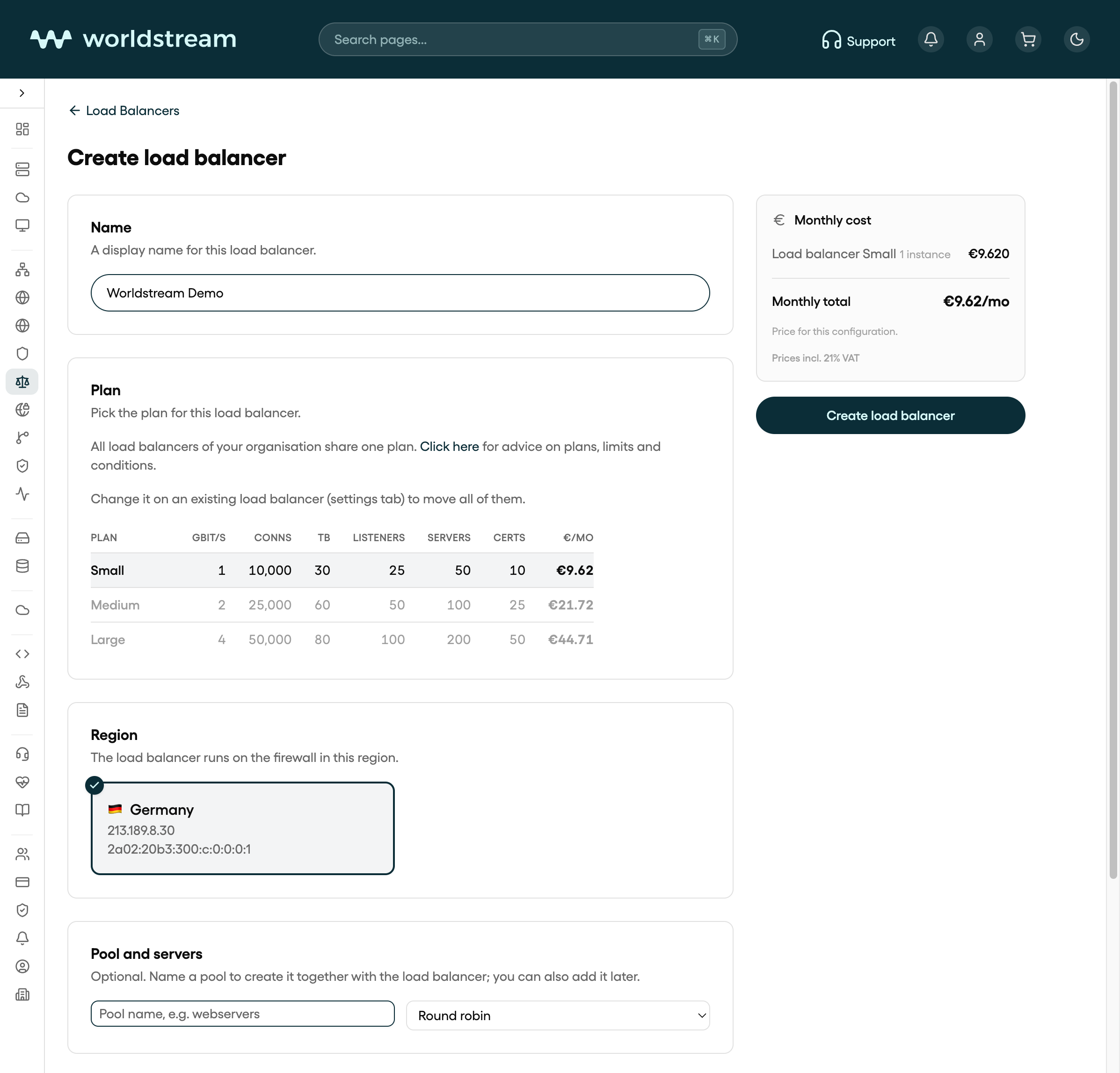
Create load balancer in Portal: name Worldstream Demo and Small, Medium, or Large plan
Create load balancer in Portal, October 2026. Name, plan, then the firewall. Your own firewalls will differ.
4

Bind the firewall

Under Region and firewall, pick the firewall that should carry this load balancer. Firewalls that already have a load balancer are not offered. If the list is empty, create or extend a firewall first.

5

Optionally add a pool and listeners

The create form can also take a first pool, real servers, and listeners. You can skip that and add them on the load balancer after it is Active. Confirm Create load balancer.

6

Wait until the status is Active

Create returns immediately. The load balancer moves through Syncing until it is Active. Error means the last apply failed; the firewall’s own NAT and filter rules are left alone. Use Re-apply on the Dashboard tab after you fix the config.
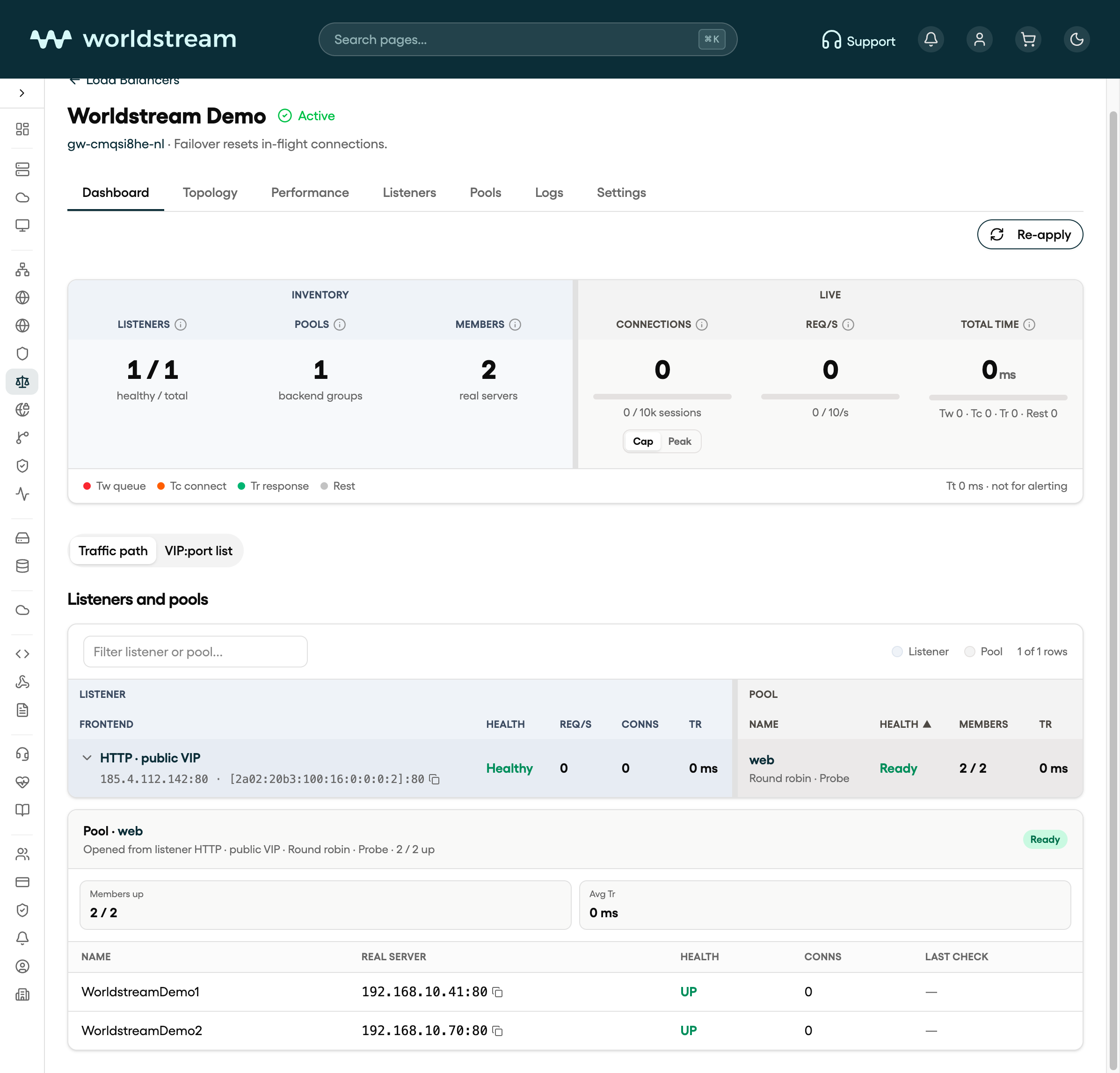
Load balancer Dashboard in Portal after the load balancer is Active, with pool web and WorldstreamDemo1 and WorldstreamDemo2
Load balancer Dashboard in Portal after the load balancer is Active, October 2026. Your own names, IPs, and counts will differ.

After it is Active

The load balancer page has these tabs:

TabWhat it is for
DashboardCounts, live connections, the VIP-to-member map, and Re-apply
TopologyHow listeners, pools, and real servers connect
PerformanceRequest rate, bandwidth, connections, and HTTP 5xx over time
ListenersThe public IP, port, and protocol that receive traffic
PoolsGroups of real servers, algorithms, stickiness, and health checks
LogsLoad balancer access and journal lines
SettingsPlan, Let's Encrypt contact email, and delete

Recommended order after create: pool → real server → listener. Traffic has nowhere to go until a pool has at least one member and a listener points at that pool.

Note: Firewall failover resets in-flight connections. New connections continue on the other firewall leg.

What this product does not do

  • It does not allocate a separate public IP for the load balancer. Listeners bind addresses that already exist on the firewall (you can add IPv4 or IPv6 there when you create a listener).
  • Real servers are IPv4. A listener can still answer on IPv6; members behind it stay IPv4.
  • UDP is not a listener protocol. Choose HTTPS, HTTP, or TCP.
  • It is not a WAF or a CDN.

Next: add a pool and real servers, then open a listener.

Verwandte Artikel

  • Load balancer plans, limits and conditions
  • Firewall basics in Portal
  • Load Balancer listeners: ports, TLS, and routing
  • Load Balancer pools: real servers and health checks
War dieser Artikel hilfreich?

Solide IT. Keine Überraschungen

Sparringspartner für IT-Reife
Wir räumen die Hindernisse aus dem Weg, damit Sie freie Bahn haben
Vorhersehbare und transparente Kosten

Kontakt

  • Industriestraat 53, Naaldwijk
Kontaktieren Sie uns
Worldstream Portal (se abre en una pestaña nueva)
  • Zahlungsmöglichkeiten
  • Missbrauch
  • Ressourcen für Entwickler
  • Network Operations Center
  • Über uns
  • Lernen Sie unser Team kennen
  • Jobs
  • Werden Sie Wiederverkäufer
  • Zertifizierungen
  • Unsere Rechenzentren
  • Unser Netzwerk
  • DDoS-Schutz
  • AMD EPYC-Server
  • Technologiepartner
  • Betriebssysteme
  • Übersicht
  • FAQ
  • Kundenfälle
  • Nachrichten und Blogbeiträge
  • Use Cases
English
Nederlands
Español
English
Nederlands
Español
  • Rechtliches
  • Transparenzhinweis