Dedicated Servers vs Bare Metal. What You Are Actually Buying
TL;DR
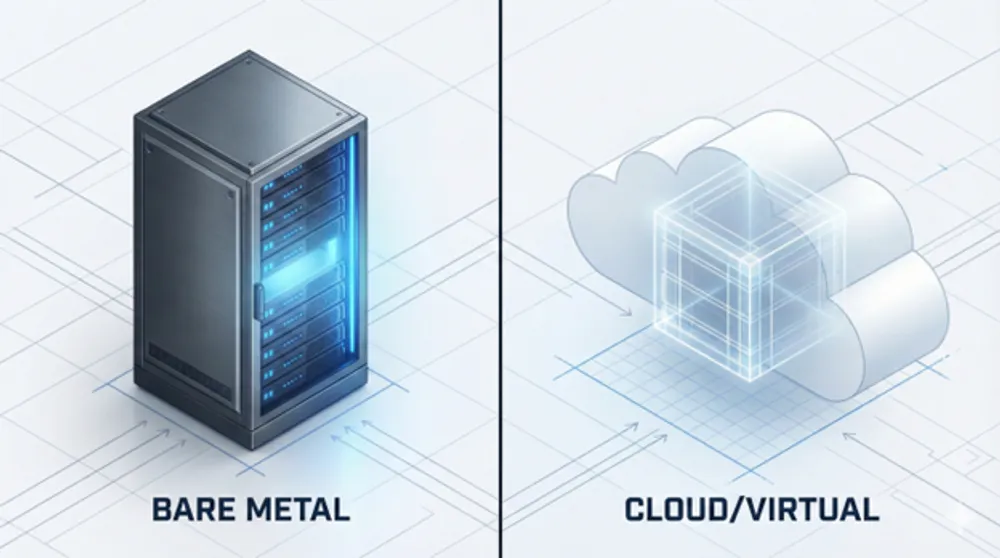
- Dedicated server and bare metal usually mean the same outcome: single-tenant physical hardware.
- “Dedicated cloud” often means a VM with reserved resources. Still virtualized.
- Cloud does not automatically mean failover. One VM is still one point of failure.
- Uptime comes from architecture: redundancy, load balancing, replication, backups, and tested recovery.
- When buying in the Netherlands or Europe, verify five things: tenancy model, location, support model, hardware replacement process, and DDoS posture.
- “No surprises” is not a slogan. It is written clarity on what is included, what is monitored, and how incidents are handled.
Dedicated Server vs Bare Metal vs Dedicated Cloud: What These Terms Really Mean
If you are searching for “dedicated server Netherlands” or “bare metal Europe”, you are not really shopping for a CPU model.
You are shopping for control.
Predictable performance. Clear responsibility. Stable costs. Fewer surprises when something breaks.
The problem is language. Providers use “dedicated”, “bare metal”, and “dedicated cloud” in ways that blur the actual tenancy model. That creates wrong expectations about uptime, failover, and support.
This post clears it up and gives you a buyer-grade checklist, focused on the Netherlands and Europe.
No hype. No vendor bingo. Just what matters in production.
Start with the only definition that matters
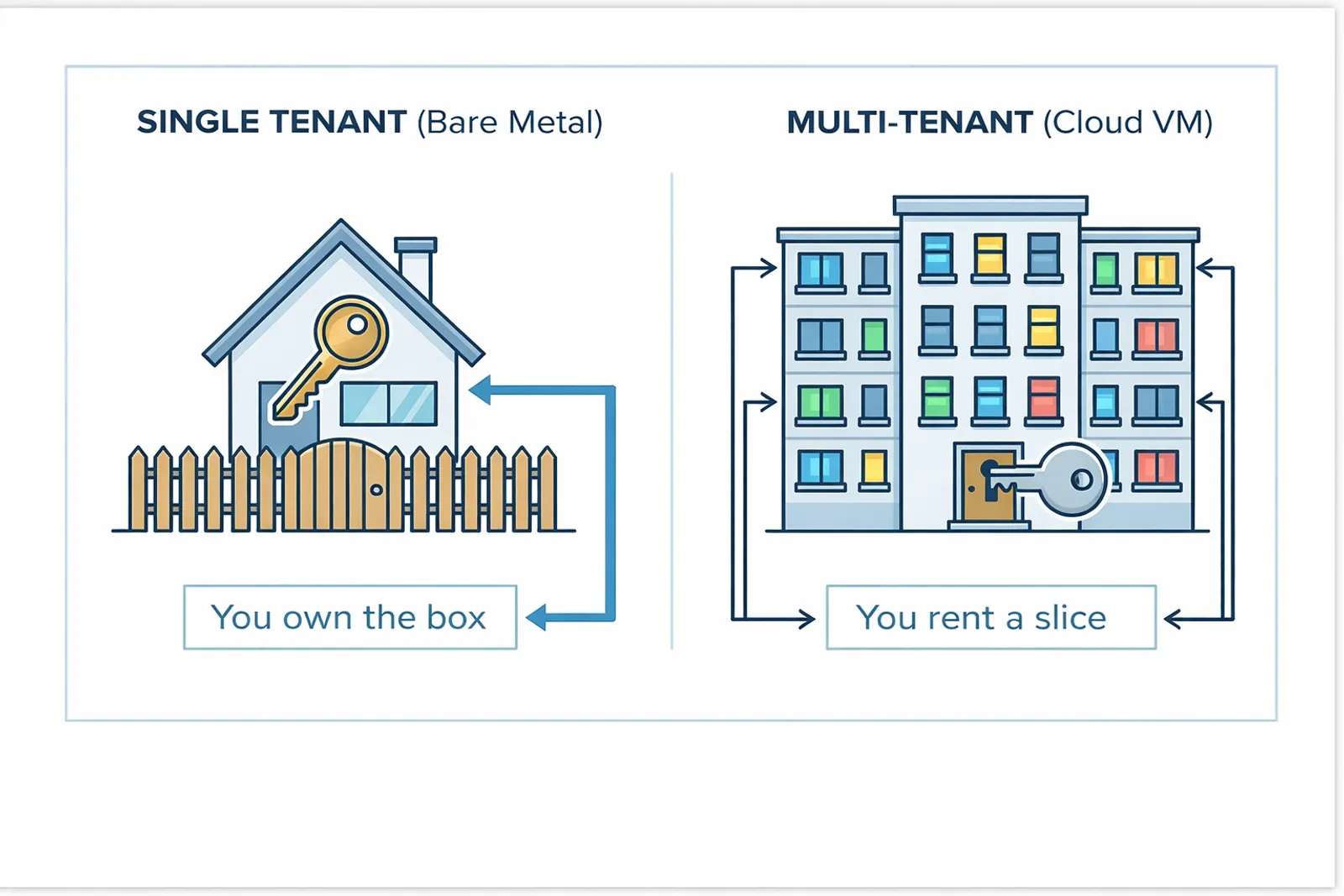
What is the tenancy model
Dedicated server
A dedicated server is a physical machine assigned to one customer.
- You control the OS.
- You control the network stack above the switch port.
- No other customer runs on that same machine.
Bare metal server
In most European hosting catalogs, “bare metal server” describes the same thing: single-tenant physical hardware.
The difference is usually delivery and tooling.
- Bare metal often implies faster provisioning.
- More automation.
- More cloud-like workflows.
But the underlying promise is the same. You get the whole machine.
Cloud server
A cloud server usually means a virtual machine on shared hardware.
You rent an isolated slice. Not the full box.
The phrase that causes most confusion: “dedicated cloud server”
This commonly means a VM with reserved resources.
- Dedicated CPU time.
- Guaranteed RAM.
- Still virtualized.
- Still sharing the physical host.
So do not buy based on the label.
Ask one direct question:
Is there a hypervisor between me and the hardware. Yes or no.
If the answer is “yes”, you are not buying bare metal.
Why naming is not a technical detail; It changes what you expect during incidents
Teams get burned because they assume the platform will protect them from failure.
That assumption is wrong in both directions:
- Cloud does not automatically mean application failover.
- Dedicated does not automatically mean “you are alone when hardware fails”.
A provider can replace a failed disk and you can still lose data if your recovery plan is weak.
A provider can offer “high availability cloud” and you can still go down if you deploy a single VM.
So the right mental model is this:
You are not buying uptime. You are buying building blocks.
Uptime is what you build from those blocks.
The real decision is not cloud vs dedicated; It is responsibility and failure design
If downtime costs money, you need to think in failure domains.
A single server is a failure domain. A single VM is a failure domain. A single region can be a failure domain.
High availability comes from architecture.
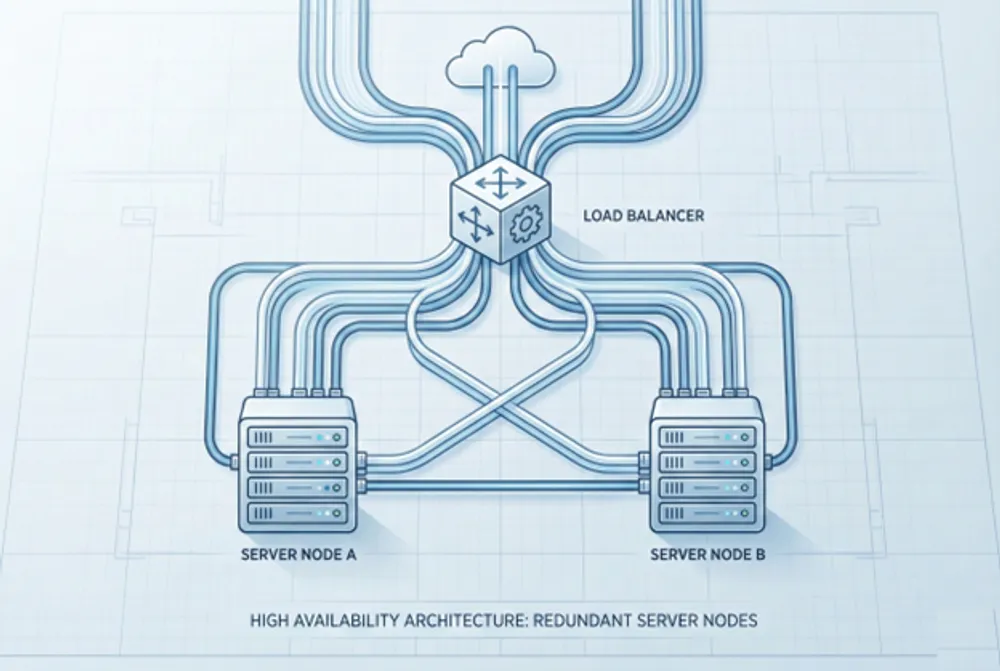
In practice, that usually means:
- Two or more instances, not one.
- A load balancer in front.
- Health checks that measure user impact, not just “port open”.
- Data replication that matches your database and consistency needs.
- Backups that live outside the failure domain.
- Restore tests on a schedule.
This is not theory. It is what separates “we had an incident” from “we were down for hours”.
Business translation:
If you need uptime, you are buying an architecture. Not a server.
Dedicated servers; What you gain, what you take on
Dedicated servers stay popular in Europe for good reasons.
What you gain
Isolation and predictability
You avoid noisy neighbors at the hypervisor layer. Performance tends to be more consistent for CPU-heavy, IO-heavy, and latency-sensitive workloads.
Control
You choose the OS and kernel settings. You control storage layout, networking, and security posture. You can run your own virtualization stack if you want.
Licensing and compliance clarity
Some software licensing models behave better on single-tenant physical machines. Some compliance conversations also get simpler when you can point to a dedicated physical host in a known location.
What you take on
More operational ownership
With dedicated servers, you usually own more of the lifecycle.
- You design redundancy.
- You run monitoring.
- You handle patching and configuration.
- You build recovery.
Some providers offer managed options to reduce that burden. But you should assume the default is: you own the workload.
Hardware failure; What should be true, and what you must verify
Hardware fails.
Disks fail. RAM fails. NICs fail. Power supplies fail.
The question is not whether it fails. The question is what happens next.
If you want “no surprises”, you need process clarity, not optimistic assumptions.
Use this checklist.
1) Who detects the fault
- Does the provider monitor hardware health proactively.
- Or do you have to detect the issue and report it.
Even when hardware replacement is included, the time to resolution often depends on detection and ticket quality.
2) What is included in the service
Ask for explicit scope.
- Are parts and replacement included.
- Are there exclusions.
- Are there different rules for different server lines.
Avoid “we will see” answers. You want written clarity.
3) What is the replacement workflow
- What diagnostics are expected.
- How quickly can they swap a disk, RAM, or NIC.
- What is the escalation path if you believe the issue is intermittent.
4) What you can do while waiting
Sometimes the right move is not “wait for repair”.
Sometimes it is:
- Migrate the workload.
- Move IPs to a standby server.
- Fail over at the application layer.
A good provider helps you understand these options clearly.
Dedicated servers in the Netherlands and Europe; What high-intent buyers should verify
When someone searches for dedicated servers in the Netherlands or Europe, the intent is usually one of these:
- Low latency to European users.
- EU legal context and data handling expectations.
- Support proximity and operational accountability.
- Reduced cross-border complexity.
Here is what matters.
Location and data residency
- Where is the server physically located.
- Can you choose Netherlands specifically.
- Is the offer clear about location, not implied.
If your compliance requirement is “EU is enough”, do not over-constrain yourself. If you need Netherlands-only, confirm it contractually.
Network posture
Ask how the provider runs its network.
- Do they operate their own network.
- How do they handle routing changes during incidents.
- How do they scale capacity.
If a provider claims large network capacity, ask what that means operationally for your workload. Capacity is not value by itself. It is value when it reduces impact during peak traffic and attacks.
Support model and proximity
“24/7 support” is cheap to claim.
The differentiator is how it is staffed and what they can actually do.
- Is support 24/7/365.
- Are engineers available, not just first-line ticket handling.
- Is there on-site capability.
- What are realistic response times.
Worldstream publicly positions “Solid IT. No surprises” with 24/7/365 availability and an average response time metric. It also positions an in-house, on-site support model. Use that as the benchmark for the type of clarity you should demand from any provider.
Commercial predictability
If you are moving workloads from public cloud to dedicated, your finance team cares about one word:
Predictability.
That means:
- Clear monthly pricing.
- Clear setup terms.
- Clear scope of what is included.
- Clear rules for extras.
If pricing is opaque, operational surprises usually follow.
Anti-DDoS dedicated servers in Europe; What “DDoS protection” must mean to be useful
“DDoS protection included” is one of the most abused phrases in hosting.
It can mean anything.
If DDoS is a real risk for your business, you need specifics.
Here is the buyer checklist.
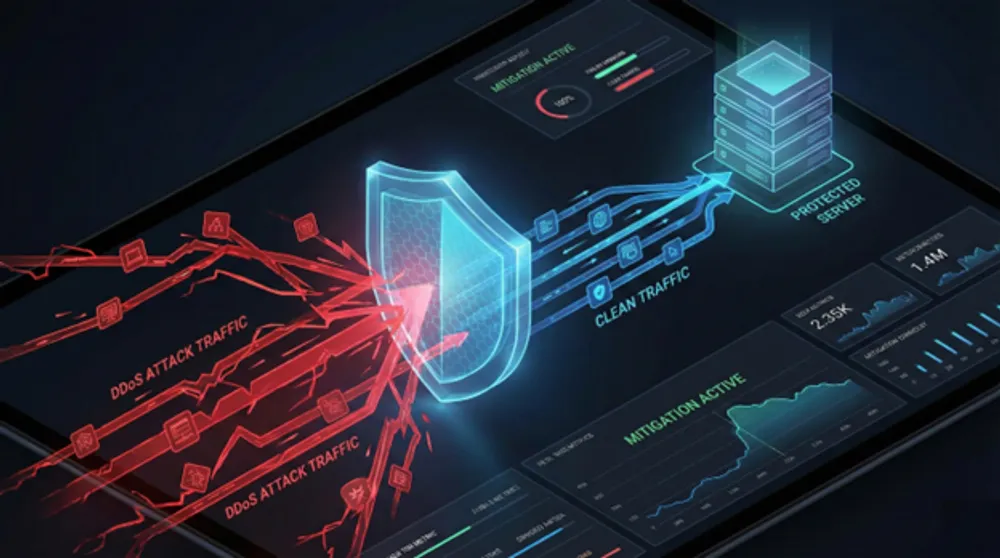
1) Where mitigation happens
If mitigation happens too late, your uplink saturates and you go down. Even if the provider can “clean” traffic elsewhere.
You want filtering integrated at network level, upstream of your ports.
2) How protection scales
Attacks spike. Good protection scales with it.
Ask:
- Is mitigation automatic or manual.
- What thresholds trigger actions.
- How quickly mitigation ramps up.
Worldstream describes scalable anti-DDoS enhanced by Nokia Deepfield Defender, with real-time threat detection at network level and stated high mitigation capacity. That is the level of specificity you should demand.
3) What you get by default
Baseline matters.
Ask:
- What is included per server by default.
- What happens when you exceed it.
- What changes during mitigation, for example filtering or rate limits.
4) Visibility and reporting
After an incident, you need evidence.
- Alerts and timelines.
- Attack type and vectors.
- What mitigation was applied.
If you cannot explain what happened, you cannot prevent a repeat, and you cannot communicate credibly to stakeholders.
Support quality; The only reliable way to evaluate it
Support is hard to measure from a website. So ask questions that force operational truth.
Incident handling
- Who answers after hours.
- What the escalation path looks like.
- Whether engineers are available during incidents.
Ownership boundaries
Ask for clear boundaries.
- What the provider monitors by default.
- What you must monitor.
- What happens if the issue is in your OS, your app, or your configuration.
A mature provider is not afraid of these questions. They welcome them because it prevents misunderstandings.
Hands-on capability
If you run dedicated hardware, practical capabilities matter.
- Out-of-band access options.
- Remote hands availability.
- On-site replacement workflow.
This is where “we have our own data centers” can matter in practice, because it can reduce coordination overhead. But you still verify the process and SLA.
Alternatives to OVH, Hetzner, Leaseweb; A framework that beats any “top 10 providers” list
When buyers search for “alternatives to OVH” or similar, they rarely want a list.
They want fewer unknowns.
Use this framework.
1) Tenancy clarity
- VM, reserved VM, single-tenant host, or true bare metal.
- Confirm it in writing.
2) Provisioning and automation
- Do you need API-first workflows.
- Do you need rapid scale.
- Do you need bare metal delivered like cloud.
Some providers do this well. Some do not. Match it to your operational model.
3) Network and DDoS posture
- Network-level detection.
- Scaling behavior.
- Default baseline.
- Reporting.
4) Support operating model
- 24/7/365 staffing.
- Engineer availability.
- Incident escalation.
5) Commercial predictability
- Clear monthly costs.
- Clear rules for extras.
- Clear terms for changes and cancellations.
If a provider cannot be clear here, “no surprises” is not possible.
Practical architecture guidance; If you want uptime, design for it
Most downtime is not a hardware problem. It is a design problem.
If you run one server and it dies, you are down. It does not matter what you call it.
Here is a practical baseline.
Stateless workloads
- Two or more nodes
- Load balancer
- Rolling deploys
- Real health checks
Stateful workloads
- Replication model that matches your database
- Clear failover mechanics
- Backups outside the failure domain
- Restore tests on a schedule
Dedicated infrastructure patterns
- Two servers in separate racks where possible
- Separate power feeds where offered
- Redundant network paths where offered
- Clear disaster recovery plan that survives human error
If you do not have time to build this, be honest about it. Either accept lower uptime targets or choose a managed approach where operational burden is reduced. But do not pretend “cloud” fixes architecture.
Where Worldstream fits, without the sales pitch
Worldstream’s positioning is built around “Solid IT. No surprises”. The intent is clear: predictable infrastructure, transparent agreements, in-house engineering, and avoiding lock-in.
From a buyer perspective, the practical signals to look for are:
- Explicit 24/7/365 support availability.
- Published response time metrics.
- Clear scope of what is monitored and handled.
- Clear DDoS posture with named tooling and scaling logic.
- Clear pricing structure and boundaries.
Use those criteria for Worldstream, and use the same criteria for every other provider you shortlist.
That is how you avoid the classic “we thought it included X” failure.
The checklist to avoid surprises
Before you buy
- Confirm tenancy model in writing. Physical or virtual.
- Confirm physical location. Netherlands or elsewhere in Europe.
- Confirm hardware replacement scope and process.
- Confirm support model and escalation path.
- Confirm DDoS baseline, scaling, and reporting.
Before you go live
- Build redundancy. Two is the real minimum.
- Implement monitoring that detects user impact.
- Test restores. Put it on a calendar.
- Document incident roles and decision paths.
If you do this, your infrastructure becomes boring. That is the goal.
FAQ
Most of the time, yes. Both usually mean single-tenant physical hardware. “Bare metal” often signals cloud-like delivery and automation, but you still get a physical machine.