VPS, Managed Hosting, or Dedicated: What You Are Actually Choosing in 2026
Knowledge blog
It has been a rough few weeks for hosting infrastructure. A pre-authentication authentication bypass in cPanel and WHM, a Linux kernel privilege escalation that fits inside a 732-byte script and affects major distributions built on kernels shipped since 2017, and a federal cybersecurity agency adding both to its known-exploited list within days. CISA set a May 3 remediation deadline for the cPanel issue and a May 15 deadline for the Linux kernel issue. More than 40,000 servers were likely compromised in the cPanel exploitation wave by the time broader reporting caught up.
After the fire drill, the question on a lot of operators’ desks was the same: who was supposed to apply the patch?
The answer depends on which hosting model you bought. And the lines between those models are blurrier than the marketing on a comparison page suggests. A VPS is not a small dedicated server. Managed hosting is not a managed VPS. Dedicated is not just “more power.” Each is a different deal about who owns which part of the stack, and the events of the past month are a clean test of what that deal actually means in practice.
This is a plain-English map of the three models, where the lines blur, and how to pick the one that matches the work you actually want to do.
Three Boxes, Three Different Deals
From the outside, all three models look the same: you log in, you see a Linux prompt, you run your application. Underneath, the deal you signed is very different.
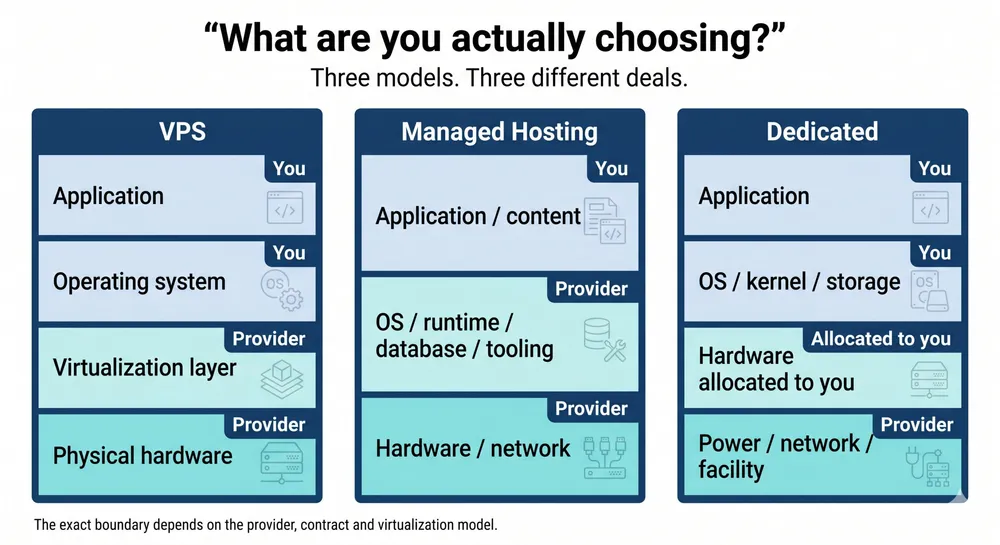
On a VPS, you rent a slice of a physical machine. The physical host and virtualization layer belong to the provider. You control the guest operating system and everything above it. The exact kernel boundary depends on the virtualization model, which matters when kernel-level vulnerabilities land.
On managed hosting, you rent an outcome. The provider runs the operating system, the runtime, often the database, and most of the tooling around it. You bring the application and the content. The control panel, cPanel, Plesk, DirectAdmin, or a custom one, is the visible surface, but the real product is the operations team behind it.
On a dedicated server, you rent the hardware itself. The operating system, kernel, storage layout, and often parts of the boot and remote-management configuration are yours to control. The exact boundary depends on the provider and contract. The provider delivers power, network, physical security, and the agreed management layer. The rest is on you, unless you buy a managed dedicated tier on top.
None of these is better in the abstract. They are different deals for different work. The mistake people make is not picking the wrong one. It is treating the one they picked like one of the others.
VPS: A Server You Control on Hardware You Share
A VPS gives you a Linux box you can SSH into, predictable monthly pricing, fast provisioning, and a real operating system to run real workloads on. For most production websites, internal tools, staging environments, lower-traffic APIs, and small-team SaaS, it is the right answer, not a compromise.
What you get on a VPS:
- Root on your own operating system, with the freedom to install whatever you need.
- Predictable, mostly flat monthly billing.
- Provisioning in minutes, not days, and the ability to add or resize instances when load changes.
- A clean line of responsibility above the virtualization layer: anything you install, you operate.
What you share with other tenants:
- The physical host and the virtualization layer. When a host-level vulnerability lands, the provider patches the host. Inside the guest, you still patch your own operating system.
- Physical resources at peak. Most VPS platforms manage this well, but a noisy neighbor can still show up as variability in I/O latency or CPU steal time during a traffic spike.
- The blast radius of a host compromise. If the hypervisor or host layer is breached, every tenant on it may be in scope.
None of that is a strike against VPS. It is the trade you signed up for: lower cost and less hardware responsibility, in exchange for a layer of the stack you do not control. The point is to know which trade you took, so you can run the box accordingly.
On a VPS, your patching responsibility starts inside the guest operating system. You apply security updates, you reboot when your guest kernel needs it, and you watch the provider’s status page for host-level maintenance that you cannot avoid. The Linux kernel CVE that landed in early May is the clearest example: every VPS guest needed attention inside the operating system, while providers also had to deal with the host and virtualization layers where applicable. The operator and the provider were on the patch path together.
Managed Hosting: Someone Else’s Operations, Your Application
Managed hosting is the model where the provider runs the server so you do not have to. In its classic form, the cPanel or Plesk control panel, the shared mail server, the one-click WordPress installer, it absorbed an entire generation of small businesses, agencies, and indie developers who did not want to be sysadmins. That is still its core promise: you upload the site, the provider keeps it running.
What “managed” actually covers varies by provider. A useful checklist when you are evaluating one:
- Operating system patching: who applies it, on what schedule, and how quickly when a CVE is added to a known-exploited list?
- Control-panel patching: which versions are tracked, and how is a zero-day handled before an upstream patch is available?
- Backups: how often, where they are stored, how a restore is initiated, and how restores are tested.
- Monitoring and incident response: who watches what, and what the actual response time is for a confirmed incident.
- Support boundary: where “managed” ends and “your application” begins.
The honest read on managed hosting is that the value is the operations team, not the control panel. Two providers can ship the same software and run very different products on top of it. One has a SOC, a documented incident playbook, and a track record of patching critical CVEs the day a working exploit is public. Another has a help desk and a forum. Both will sell you “managed hosting.” The work of evaluation is finding out which one you are buying.
What managed hosting does very well, when you pick a serious operator: takes the day-to-day administrative burden off your plate, gives you a single throat to call when something breaks, and turns server operations into a predictable monthly fee instead of an unpredictable time sink. That is a real product, and for a lot of buyers it is the right product.
Where it gets uncomfortable is when the boundary is unclear. “Managed” does not mean “insulated.” If a critical authentication-bypass vulnerability lands in the control panel itself, every server running that panel is exposed until the provider patches. The customer does not get to choose the patch window. That is part of the deal. The way to make peace with it is to pick a provider whose patch cadence and disclosure habits you can audit, not to pretend the dependency does not exist.
Dedicated: A Box You Control Much Further Down the Stack
A dedicated server is the simplest deal of the three to describe and the most demanding to operate. The hardware is allocated to you. No tenant on the other side of the hypervisor, because there is no hypervisor unless you put one there. No shared guest environment, no shared physical resources, no scheduling overhead from a virtualization layer.
That means you control, or can contract for control over:
- The operating system and kernel, including hardening choices that are not always possible in shared environments.
- The boot path and platform configuration, depending on the server model and provider policy.
- Out-of-band management access, ideally with IPMI and BMC traffic on a separate management network that is not reachable from the public internet.
- Storage layout, RAID configuration, and disk encryption keys.
- Patch timing. When a critical CVE lands, you decide when the box reboots.
That last one is the difference that mattered most over the past month. On a dedicated box you operate, applying the kernel patch for a privilege-escalation CVE is a maintenance window you schedule. There is no waiting on the host operator, no shared blast radius, no second-order outage when the host reboots and your guest reboots with it.
The cost of that control is responsibility. Patching, monitoring, backups, incident response, capacity planning, unless you buy a managed tier on top, all of it is yours. Dedicated is not the right answer for a team that does not have, or does not want to build, a real operations practice. It is the right answer when you have a workload whose shape genuinely benefits from deeper stack ownership: steady base load, latency-sensitive paths, isolation requirements from policy or compliance, or a security model where “the kernel is mine” is a hard requirement.
If you do not have any of those drivers, dedicated is overhead. If you do, it is the only model that gives you the levers you need.
Where the Lines Blur
In practice, the three categories overlap in ways that the comparison pages do not always make clear.
Managed VPS exists. So does unmanaged dedicated. So does a dedicated server that is itself running a hypervisor and renting VPS slices to internal tenants. The category names tell you where you start; they do not tell you the full deal.
Three questions cut through the marketing:
- Who controls the kernel? If the answer is “you,” you control the guest kernel. If the answer is “the provider,” you are depending on the provider for that layer. The exact answer depends on the virtualization model.
- Who applies the patch? Walk through what happens on a Saturday morning when a critical CVE drops. Whose pager goes off? Whose change ticket is filed?
- Whose blast radius is yours? If the host is compromised, are you in scope? If the control panel is compromised, are you in scope? Honest answers here are more useful than feature lists.
Once you can answer those three, you can ignore most of the comparison-table noise. The product underneath has a shape, regardless of what label is on the marketing page.
The Patching Question Is the Decision Question
The most useful way to feel the difference between the three models is to walk through what happens during a real CVE event. The past month gave us two clean ones, a control-panel authentication bypass and a Linux kernel privilege escalation, inside a single 30-day window. Both ended up on a federal known-exploited list. Both had working exploits in the wild before patches were universally applied.
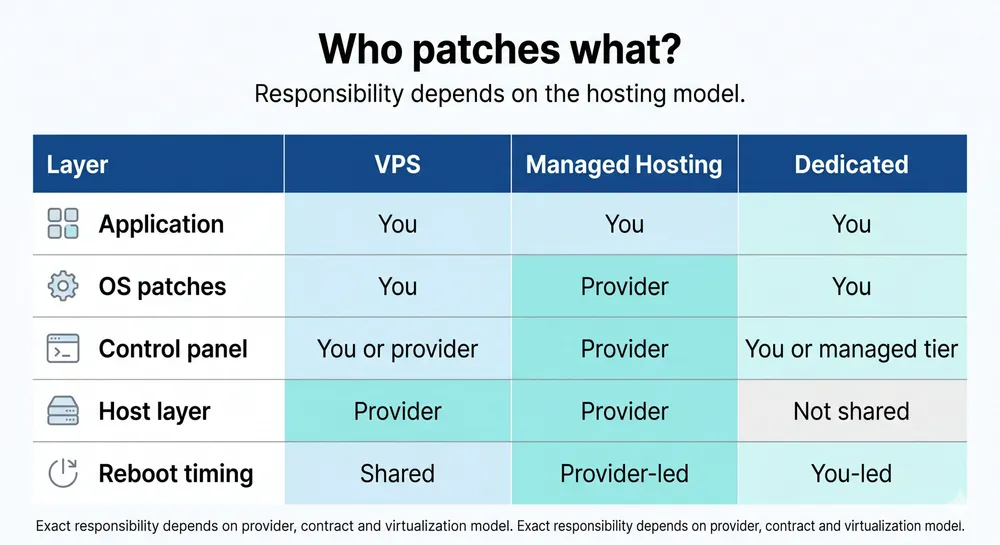
Here is what the three models looked like when those advisories landed.
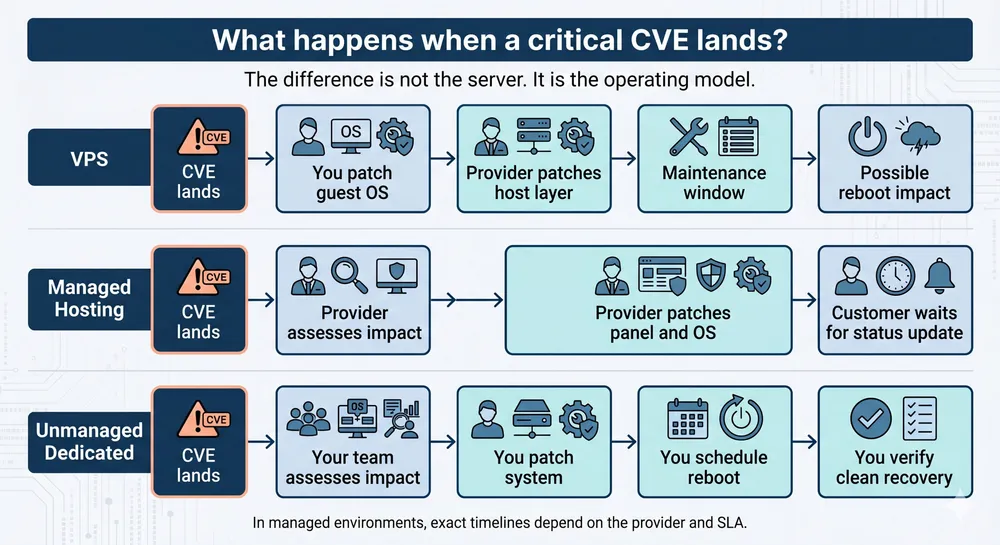
On a VPS
Two patch tracks running at once. You patched the operating system inside your guest as soon as your distribution shipped the updated kernel. The provider patched the host or virtualization layer where it was affected and scheduled host maintenance where needed, which could force your guest to reboot too. You read the provider’s status page, accepted the maintenance window, and moved on. If your provider was slow to schedule, you waited.
On managed hosting
The provider patched the control panel and the underlying operating system on their schedule. If you were on a serious operator, that schedule was hours. If you were not, it was days, or longer. You watched the status page and the email queue. Where the panel itself was the vulnerable component, no amount of work on your side could have closed the window earlier. The dependency is structural.
On unmanaged dedicated
Your patch cadence was your patch cadence. You applied the kernel update, scheduled a reboot in your maintenance window, and verified the system came back clean. There was no upstream host operator holding the patch window, and no shared host whose reboot you had to wait for. The flip side: nobody was applying the patch unless you did.
On managed dedicated
The deal is whatever your contract says it is. Read the SLA. The valuable managed-dedicated agreements specify a response time for KEV-listed CVEs, a defined patch window, and an explicit handoff for components that the contract does not cover. The weak ones leave it ambiguous.
None of these is the “right” outcome in the abstract. They are different shapes of the same event. The right model for you is the one whose shape matches the operations practice you actually run, not the one whose marketing page sounds the most reassuring.
How to Choose, Honestly
Three honest questions go further than any comparison table.
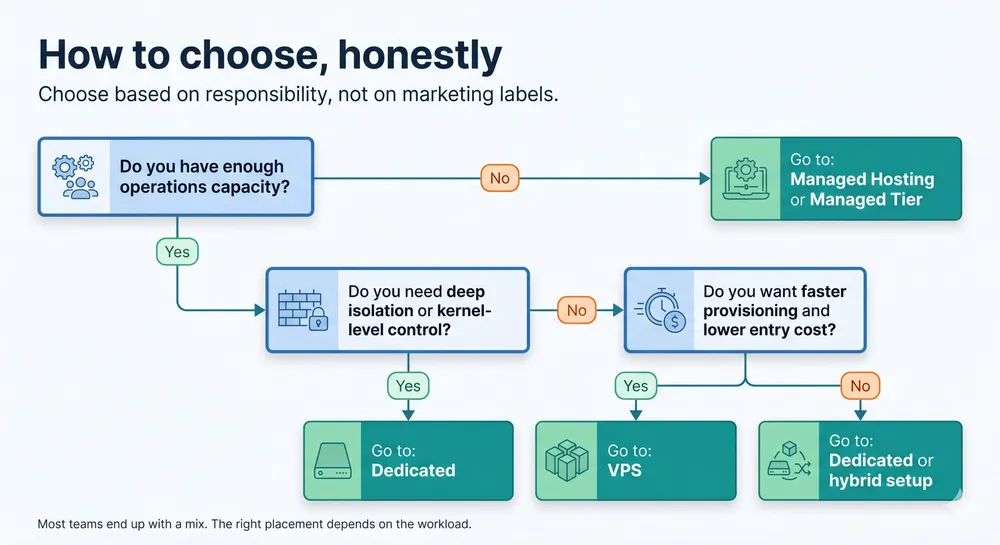
- How much operations time do you actually have?
Not how much you wish you had. How much your team can sustainably spend on patching, monitoring, backups, and incident response in a normal week. Be honest. Picking a model that requires more operations than you can deliver is how teams end up in the headlines.
- What is your blast radius tolerance?
If a host compromise puts you in scope, is that acceptable for this workload? For an internal staging environment, often yes. For a system that processes sensitive customer data under a regulatory regime, often no.
- What is your appetite for someone else’s schedule?
On VPS and managed hosting, your patch timing is partly the provider’s. On dedicated, it is mostly yours, within the boundaries of the contract and facility. Which constraint do you mind less when something urgent lands at 02:00?
Most teams need a mix. A small SaaS might run its public marketing site on managed hosting, its application servers on VPS, and its primary database on a dedicated box where I/O latency and patch timing matter. A growing platform might invert that as it scales. There is no single right answer. There is a right placement for each workload, and the placements change over time.
Where Worldstream Fits
Worldstream operates dedicated servers and colocation in our own Dutch data center, with flat-rate bandwidth and a network we run end to end. The hardware floor is ours. The operating system, kernel, and everything above it are yours, unless you choose a managed layer on top. That is the deal we have always been transparent about.
We are also bringing a VPS product to market shortly. The model is different from dedicated by design: shared hardware, faster provisioning, lower entry price. We will be just as transparent about what that deal includes and what it does not. A VPS is not a smaller dedicated server, and we will not pretend it is. It is a different product for different work, and the decision between them should be deliberate, not a default.
If your workload’s shape calls for deeper stack ownership, dedicated is the right call. If it calls for a controllable Linux box with predictable monthly pricing and no hardware to lifecycle, VPS will be the right call. If you want someone else to handle most of the operations on top, the managed tier is the layer that fits. The point is to pick the model whose deal you are happy to live with on a quiet Tuesday, and on the Saturday morning when a CVE drops.
The Bottom Line
VPS, managed hosting, and dedicated servers are not three points on a single quality scale. They are three different deals about who owns which part of the stack, who applies which patch, and whose blast radius is whose.
The events of the past month did not change which model is best. They surfaced the deal each model has always been. The operators who came through clean were not the ones with the most expensive hosting plan. They were the ones who understood what their hosting plan owed them, what it did not, and operated accordingly.
Solid IT. No Surprises. That starts with knowing exactly what you bought.