Dedicated Server Hosting. Worth It vs VPS and Cloud?

TL;DR
Dedicated servers are worth it when you have a proven bottleneck (often I/O latency under load), you need consistent performance or stronger isolation, and you are ready to own operations. They are not worth it if you are upgrading out of anxiety or you lack monitoring, backups, and a clear incident plan. Uptime is not a hosting model. It is architecture.
Is Dedicated Server Hosting Worth It? A Practical Framework vs VPS and Cloud
Dedicated servers can be the right move. They can also be a clean way to buy yourself a new job as an unpaid sysadmin.
Most teams do not fail because they picked the wrong hosting model. They fail because they upgraded infrastructure without understanding what was actually breaking.
This post gives you a practical decision framework. No vendor hype. No magical uptime promises. Just trade-offs.
Start with the uncomfortable question
Why do you want a dedicated server?
If the honest answer is “it sounds more serious”, stop. That is not a requirement. That is anxiety.
Dedicated hosting is worth it when you can connect it to a specific constraint:
- unpredictable performance during peaks
- storage latency that ruins checkout or API response times
- a need for isolation due to policy, compliance, or risk tolerance
- operational control requirements you cannot meet on shared platforms
If you cannot name a constraint, you are not ready to choose dedicated. You are still diagnosing.
What changes when you move to dedicated
People use “performance” as a single word. That is lazy thinking. Performance is a bundle of different bottlenecks.
Dedicated changes some of those bottlenecks. It does not touch others.
CPU consistency
On dedicated hardware, your CPU cycles are yours. That removes two common sources of variability:
- oversubscription effects on shared hosts
- noisy neighbor workloads that steal capacity at the worst moment
What it does not change:
- slow code paths
- inefficient queries
- poor caching strategy
- single-thread limits in your application stack
If your bottleneck is a bad query, dedicated just makes the bad query fail faster under higher load.
Memory predictability
Dedicated RAM is dedicated. That matters when you rely on memory for:
- database caching
- in-memory sessions or queues
- application-level caching layers
It helps when you see:
- swap activity
- out-of-memory kills
- cache eviction under load
It does not help if your memory usage is unstable because of leaks, unbounded queues, or poor workload control.
Storage and I/O behavior
This is the one most teams feel first, especially in ecommerce.
You can survive CPU pressure with autoscaling and caches. You cannot hide storage stalls.
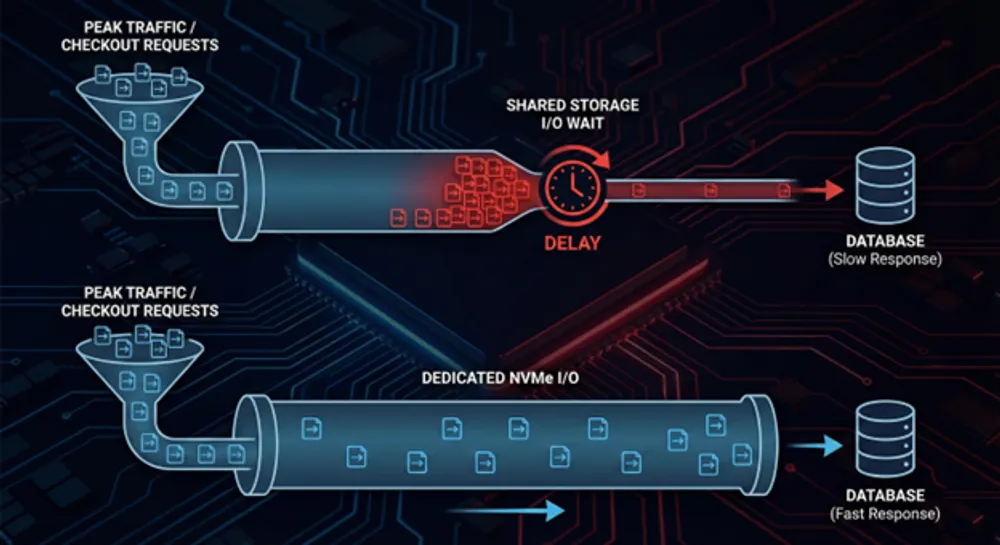
Typical symptoms:
- checkout feels fine, then suddenly slows down hard
- page requests hang during traffic spikes
- database writes or migrations cause site-wide latency
- backups overlap with peak traffic and everything gets worse
Dedicated can help here because you can choose and control the storage profile. It also removes shared storage contention that can happen on some VPS platforms.
But do not guess. Verify.
What to measure:
- iowait
- disk queue depth
- p95 and p99 latency on database calls
- backup window overlap with peak usage
- slow query logs and lock contention
If you do not have these metrics, you are not selecting infrastructure. You are gambling.
Uptime is not a hosting model. It is architecture
A dedicated server does not automatically improve uptime.
A single dedicated machine is a single failure domain. One of these happens, and you are down:
- disk failure
- motherboard failure
- file system corruption
- kernel panic
- operator error
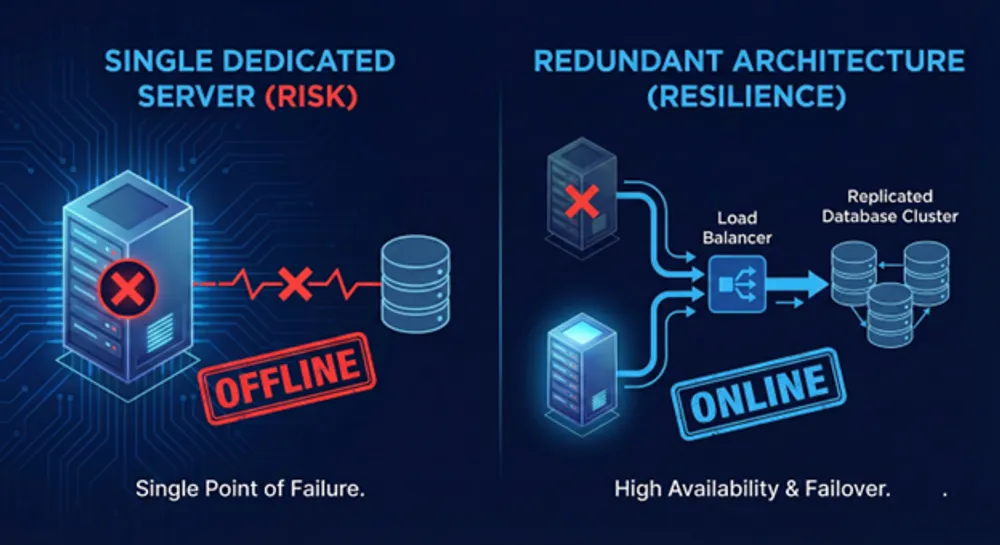
Cloud platforms often make redundancy easier to build quickly. Dedicated platforms can be extremely reliable too, but only if you design for failure.
So the real question is:
What downtime can you tolerate, and what are you willing to build to avoid it?
If your business cannot survive a single server outage, you need more than a bigger box. You need redundancy.
That can mean:
- database replication and failover
- load balancing across multiple nodes
- off-host backups with restore testing
- clear runbooks and alerting
Dedicated can be part of that. It is not the whole plan.
The hidden cost of dedicated is operational ownership
Dedicated gives control. Control means responsibility.
You now own more of the outcomes.

What you will own on unmanaged dedicated
- OS patching and reboot windows
- firewall and access rules
- monitoring and alerting
- backup configuration
- restore testing
- incident response
If you do not want to do that work, do not pretend you will figure it out later. Later is when something breaks.
When managed dedicated makes sense
Managed dedicated is not about being less technical. It is about being realistic.
Choose managed if:
- you are scaling product and cannot spend hours on ops every week
- you need predictable outcomes more than maximum control
- you want clearer escalation and support boundaries
- you need someone to handle routine hygiene like patching and monitoring
Unmanaged is fine, but only if you already operate like a professional team.
Backups are where dedicated buyers get burned
This is the most common dedicated server regret.
Some virtualized environments make snapshots and platform backups easy. Dedicated often does not, unless you explicitly buy or build it.
This does not mean dedicated is unsafe. It means you must treat backups as a first-class system, not a checkbox.
A sane baseline:
- 3-2-1 backup approach. Three copies, two different media, one offsite
- automate backups
- encrypt backups
- test restores regularly
- define RPO and RTO, even if you are small
If you cannot explain how you restore after a disk failure, you do not have backups. You have hope.
Security. Dedicated gives control, not automatic safety
Dedicated can reduce some multi-tenant risks and it gives you full control of the stack.
That can be valuable if you need to enforce:
- stricter hardening policies
- segmentation and least privilege access
- custom firewalling and traffic inspection
- specific compliance controls
But it also means you own:
- patch cadence
- key management hygiene
- log retention choices
- intrusion detection tooling
- incident response readiness
In practice, many breaches come from basic operational failures, not from hosting type.
If your team is not mature operationally, a simpler managed platform can be safer than an unmanaged dedicated box.
The real decision criteria buyers should use
If you want a clean decision, use this order.
1. What is the bottleneck?
Do not switch hosting models without evidence.
Common bottlenecks and what they point to:
- CPU saturation
You may need more cores or better single-core performance. You may also need to fix code. - Memory pressure or swap
You may need more RAM, better caching, or a different database tuning approach. - I/O wait spikes and disk queueing
You may need a stronger storage profile, better backup scheduling, or a separation of workloads. - Network saturation or attack traffic
You may need upstream filtering, better rate limiting, or DDoS mitigation.
2. What are the failure scenarios you can tolerate?
Write down what happens if the server dies at 02:00.
- Do you lose data?
- How fast can you restore?
- Who gets paged?
- What does downtime cost?
If your answers are vague, your plan is vague.
3. Who is responsible for what?
Before you buy dedicated, define:
- what the provider guarantees
- what you guarantee internally
- what happens during incidents
- how support works in practice
A good provider will be clear. A bad provider will hide behind vague promises.
How to evaluate dedicated server providers in Europe
Do not start with specs. Start with how the provider behaves when things go wrong.
Support quality that actually matters
Marketing claims about support are useless. Ask operational questions.
- Who handles hardware replacement?
- Is there 24/7 on-site capability or remote hands?
- What is the escalation path?
- How are incidents communicated?
- What does the provider need from you to act quickly?
The fastest way to test support is not reading testimonials. It is asking detailed questions and seeing how they respond.
Predictable pricing and clear contracts
A lot of frustration in hosting comes from unclear boundaries.
Ask:
- What is included in the monthly price?
- What triggers extra charges?
- What are the terms for upgrades and cancellation?
- What is the process for emergency work?
If you cannot predict the bill, you cannot control risk.
Backup responsibility clarity
Ask directly:
- Do you provide backups by default?
- Is backup storage on a separate system and separate location?
- Who owns restore operations?
- How often should restore tests happen?
You are not being difficult. You are being professional.
Network and DDoS transparency
Even if your current problem is performance, availability will become a problem sooner or later.
Ask:
- Where does mitigation happen?
- Is mitigation always-on or reactive?
- What is included vs optional?
- How do you communicate during an attack?
Avoid anyone who answers with buzzwords and no details.
Choosing a dedicated server location in Europe
Most buyers are not asking “which country has the best servers”. They are asking where infrastructure should live to meet latency expectations, customer contracts, and internal policy.
Latency and user experience
If your workload is latency-sensitive, measure latency from your user regions.
Do not assume. Test.
For many businesses, a well-connected Western Europe location delivers good performance across multiple countries. But the only honest answer comes from measurement.
Data residency and procurement
Sometimes a country in a search query is not about speed. It is about policy.
If residency is mandatory, choose based on that constraint first.
If residency is not mandatory, do not pay for locality you do not need. Pay for clarity, support quality, and reliability.
Operational proximity and support expectations
Some teams care less about physical location and more about:
- communication clarity during incidents
- support that can act quickly on hardware
- realistic problem-solving, not ticket theatre
That is a legitimate requirement. It should be treated as such.
A simple worth it checklist
Dedicated is usually worth it when you can tick multiple boxes.
Performance signals
- you see unpredictable performance you cannot explain
- you have confirmed I/O wait, queueing, or storage latency spikes
- your database-heavy paths slow down under burst traffic
- your workload needs consistent performance under load
Business signals
- downtime has real and measurable cost
- you need stronger isolation for policy or risk reasons
- you can fund redundancy, not just a bigger single server
Operational signals
- you have monitoring and alerting that you trust
- backups are automated and restore-tested
- you have runbooks and clear on-call ownership
If the operational boxes are not checked, managed services are often the smarter move.
Where Worldstream fits in this reality, without the pitch
European buyers are often tired of two problems:
- unclear responsibility boundaries
- unpredictable cost and vague support
Worldstream’s stated approach is built around the opposite. Focus on infrastructure, clear agreements, predictable spending, and support close to the hardware. Worldstream states it runs its own data centers and its own network in the Netherlands, with in-house engineers and 24/7 support. It also positions “Solid IT. No surprises” as a core principle.
That matters because dedicated hosting is not just a product. It is an operational relationship.
If you want dedicated servers, choose a provider whose operating model matches how you want to run IT. Transparent, predictable, and clear about responsibility is not a nice-to-have. It is the whole point.
The honest conclusion
Dedicated servers are not automatically better. They are more explicit.
You trade platform convenience for:
- more consistent resource access
- more control over stack and tuning
- clearer isolation
You also trade away:
- some default safety nets
- easy redundancy unless you build it
- the illusion that someone else is responsible
Dedicated is worth it when you can point to the bottleneck and you are ready to own the outcome.
If you want one action step: capture metrics during your next spike. CPU, memory, disk I/O wait, and database latency. Then decide.
That is how you stop guessing and start engineering.
FAQ
Move when you have evidence of a bottleneck that a VPS cannot reliably solve, like persistent I/O wait, unpredictable performance due to contention, or a need for strict isolation. If you cannot point to metrics, start by measuring before migrating.