Dedicated Server vs Cloud in 2026: The Practical Placement Framework

TL;DR
- Dedicated servers win when workloads are steady 24/7, latency-sensitive, or data-transfer-heavy (because cloud outbound bandwidth/egress is explicitly priced).
- Performance predictability is a legitimate driver: multi-tenant environments can suffer “noisy neighbor” effects (a known shared-resource risk).
- VPS is the middle ground: often the right choice for “I want a server I control” without owning hardware—but it can still inherit multi-tenant variability.
- Verdict: Use cloud for bursts, speed, managed services, and uncertainty. Use VPS for simple, moderate, predictable services where multi-tenancy is acceptable. Use dedicated (bare metal) for base load, consistent performance, and tighter operational control—as long as you can operate it well.
When Does It Actually Make Sense to Run Your Own Dedicated Server Today?
For years, “go cloud” was treated like a default setting—almost a moral stance. But in 2026, the more honest infrastructure question is rarely “cloud vs on-prem.”
It’s: where does this specific workload belong—given its shape, risk profile, and economics?
That shift is often described as cloud repatriation: moving some workloads back from public cloud to dedicated infrastructure or hybrid deployments. It’s not a mass retreat. It’s what maturity looks like when teams stop chasing narratives and start placing workloads where they make operational and financial sense.
So the question isn’t “Is cloud bad now?”
It’s: When are you paying cloud prices for benefits you’re not actually using?
Because cloud isn’t “a computer.” It’s a bundle:
- elasticity on demand
- managed services and APIs (databases, queues, object storage, IAM)
- rapid provisioning and automation primitives
- a global footprint
- hardware abstraction (someone else deals with failed components)
If you genuinely need that bundle, cloud is often the rational answer.
But if your workload is predictable, always-on, and sensitive to latency or data transfer, cloud’s strengths can become expensive ballast—especially because providers explicitly price outbound data transfer/bandwidth (egress) and because distributed architectures can create extra cross-boundary traffic.
This guide gives you a decision framework that’s practical, not ideological.
The Real Trade: Elasticity Tax vs Responsibility Tax
A dedicated server doesn’t magically simplify infrastructure. It changes which pain you pay for.

In cloud, you pay an “elasticity tax”
You’re paying for optionality: scale up/down quickly, fail over more easily, spin up environments in minutes, and leverage managed services.
You’re also paying for metered usage. One of the most underestimated meters is data transfer—especially outbound traffic.
Cloud is often priced like a premium service: it converts uncertainty into a bill you can run today instead of capacity you must buy and manage.
On dedicated, you pay a “responsibility tax”
You own:
- OS and dependency patching
- monitoring and alerting
- backups and restore testing
- security hardening
- capacity planning
- hardware lifecycle and failures
You can outsource pieces (managed hosting, smart hands, support contracts), but the system is still “yours.”
The upside: fewer metered surprises and clearer performance boundaries—if you operate it with discipline.
Agency during incidents (the part most cost models ignore)
Public cloud can reduce hardware failure headaches, but it also creates a dependency boundary. When an upstream platform issue, regional incident, policy change, or account limitation hits, your ability to remediate may be limited. Dedicated infrastructure increases the range of problems you can personally solve—while also making more problems “yours” in the first place. This isn’t about which model is “more reliable” in general; it’s about control, blast radius, and who holds the levers when something breaks.
Where VPS Fits (the piece most comparisons skip)
A lot of “dedicated vs cloud” articles miss the option people actually buy most often: VPS.
A VPS is usually the right answer when you want:
- a server you can SSH into and control end-to-end
- predictable monthly pricing
- less operational burden than owning hardware
- faster provisioning than buying and racking machines

But it’s still commonly multi-tenant at the physical host level, which means you can inherit some of the same “shared resource” behaviors that motivate dedicated in the first place (performance variability, IO contention, etc.). Some VPS offerings mitigate this with dedicated CPU allocations or performance tiers, but the general trade remains:
- VPS: simpler and cheaper than dedicated, usually “good enough,” but not a guarantee of consistent performance under all conditions.
- Dedicated: clearer isolation and predictability, but more responsibility and less elasticity.
- Cloud: maximum optionality and managed building blocks, but metering and complexity can stack up fast.
If you’re deciding between VPS and dedicated specifically, keep this simple:
- choose VPS when multi-tenancy is acceptable and you want speed/simplicity
- choose dedicated when the workload is sensitive to performance variance, IO, consistent throughput, or strict isolation requirements
When Dedicated Servers Still Make Sense (The Short List That Holds Up)
Dedicated servers still earn their place in modern stacks when the workload has one or more of these properties.
1) Your workload is steady 24/7 (base load)
Cloud economics shine when you can turn things down, scale dynamically, or replace work with managed services.
But if a service runs all day, every day at meaningful utilization, you’re often buying flexibility you don’t use. This is a common repatriation pattern: stable workloads come back because they’re easy to forecast and benefit from fixed-cost capacity.
Reality check: Pull 30 days of CPU/RAM utilization. If the line is basically flat, you should at least model a dedicated baseline.

Where VPS fits:
- VPS can be a great “base load” option too—until the workload becomes performance-sensitive or you start paying for bigger and bigger instances that still don’t buy you the predictability you need.
2) You’re data-transfer heavy (egress is structurally expensive)
If your product is “moving bytes,” outbound transfer isn’t a rounding error—it’s a primary cost driver.
Common egress-heavy patterns:
- streaming and large downloads
- distributing large datasets
- analytics exports
- multi-region replication and cross-zone traffic
- “chatty” architectures where services constantly talk across boundaries
Dedicated infrastructure can offer flatter bandwidth economics depending on contract structure, which can be attractive when outbound traffic is large and predictable.
Where VPS fits:
- VPS can be fine for modest traffic.
- If your bandwidth profile is large and stable, scrutinize the provider’s bandwidth model (commit, included transfer, overage, fair use). The economics vary widely.
3) You need predictable latency and jitter (performance consistency beats peak performance)
A lot of teams chase “more CPU” when the real issue is variability.
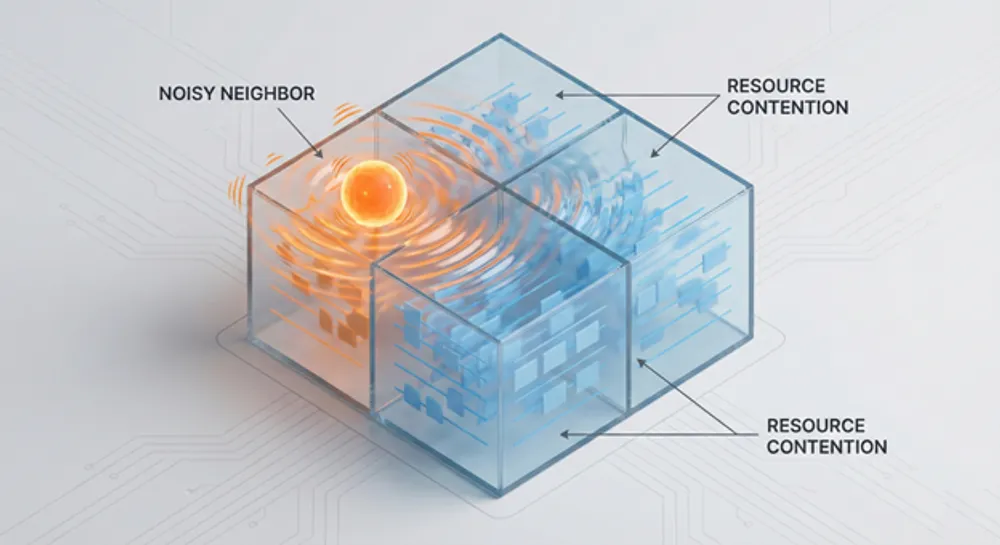
In shared environments, unpredictable contention can show up as:
- occasional slow queries
- spiky IO latency
- intermittent timeouts
- “it’s slow sometimes” incidents that are hard to reproduce
Dedicated servers reduce this category of variability because you remove resource sharing at the host level.
Where VPS fits:
- VPS is often fine for web apps, APIs, and services tolerant of occasional variance.
- If “sometimes slow” is a business problem (or an incident generator), dedicated becomes easier to justify.
4) Your workflow depends on “hot data” access (storage + locality are the product)
Not all “performance” is CPU. Sometimes performance is simply: open the file instantly.
If your users repeatedly access large working sets (media assets, CAD files, large repositories, internal datasets), you pay in:
- transfer time
- latency
- friction and context switching
Dedicated infrastructure, especially near users or on fast private connectivity, can turn “waiting” into “working.”
Where VPS fits:
- VPS can work for remote teams and lighter datasets.
- If the workflow depends on heavy, repeated data access, locality and throughput start to dominate the decision.
5) You need clearer control boundaries (governance, audits, data locality)
Operationally, governance is about:
- where data resides
- who can access it (including physical access boundaries)
- what audit evidence you can produce
- how easily you can reason about segregation and chain-of-custody
Cloud can be compliant, but dedicated infrastructure can be easier to explain, audit, and enforce—especially when you need deterministic locality or specific contractual boundaries.
Where VPS fits:
- VPS can meet many governance needs, especially with strong encryption and good access controls.
- Dedicated becomes attractive when you need stricter isolation guarantees or clearer physical/logical boundaries.
6) You run always-on internal labs, build farms, training, or simulations
Some environments are “permanent fixtures”:
- testbeds
- CI/build farms
- network labs
- long-running simulations
- staging that never sleeps
These workloads tend to be stable and benefit from “buy once, use constantly” economics. Cloud can still be useful for spikes (e.g., temporary test bursts), but a dedicated baseline often makes sense.
Where VPS fits:
- VPS is great for smaller labs and build systems.
- Dedicated is compelling when the environment becomes large, constant, and performance-sensitive.
When Cloud or VPS Is the Better Answer (Pretending Otherwise Gets Expensive)
This isn’t a “cloud bad” piece. Cloud still wins—cleanly—in several situations.
1) Demand is unpredictable or bursty
If you genuinely have “sometimes 2 servers, sometimes 200,” fixed capacity becomes either:
- expensive overprovisioning, or
- downtime and panic
Cloud’s strongest value proposition remains elasticity.
2) Managed services replace entire categories of work
If you can use managed databases, queues, object storage, and identity systems that reduce operational burden, cloud can be cheaper in the only way that matters: total system cost, not just compute price.
3) Your team can’t commit to operational maturity
Dedicated servers don’t forgive:
- “we’ll do backups later”
- “patching when we remember”
- “security hardening after launch”
If you can’t commit to patch cadence, monitoring, restore drills, and incident response, dedicated isn’t a cost optimization—it’s a reliability and security downgrade.
VPS sits in-between:
- You still manage OS/security/backups, but you don’t manage physical hardware.
- It’s often the best compromise for teams that want control without owning the entire lifecycle.
The Decision Framework You Can Actually Use
Stop arguing “cloud vs dedicated.” Decide workload by workload using a repeatable process.
Step 1: Classify the workload
Tag one service:
- Base load: steady 24/7 vs Spiky: seasonal/bursty
- Data-heavy: high outbound transfer vs Compute-heavy: CPU-bound
- Latency-sensitive: interactive/user-facing vs Latency-tolerant: batch
- Governance constraints: strict locality/control vs standard
Step 2: Model the three cost buckets
You aren’t comparing two invoices. You’re comparing three realities:
1. Platform costs
- cloud compute + storage + outbound bandwidth/egress
- VPS instance costs + storage + bandwidth model
- dedicated costs + bandwidth model
2. People/ops costs
- patching, security, backups, monitoring, on-call, incident response
3. Failure costs
- downtime impact, performance variability, recovery time
Most “cloud is cheaper / dedicated is cheaper” arguments fail because they only count bucket #1.
Step 3: Choose based on what you’re buying
- Choose cloud when you’re buying optionality: speed, burst, managed building blocks.
- Choose VPS when you’re buying control and simplicity: a predictable server you manage, without hardware ownership.
- Choose dedicated when you’re buying certainty: predictable performance boundaries and stable long-run economics—assuming you can operate it well.
The Most Realistic End State: “Cloud Smart” Hybrid
If “cloud repatriation” makes you picture a U-turn back to 2008, that’s the wrong mental model.
Most organizations that rebalance don’t abandon cloud. They:
- carve out a dedicated baseline for steady, performance-sensitive, or data-heavy workloads
- use VPS for straightforward services where “server control” matters and multi-tenancy is acceptable
- keep cloud for experimentation, global distribution, bursting, and managed services
That’s what “cloud smart” looks like: not one answer—a portfolio.

FAQs
It’s happening mostly as selective rebalancing, not a mass retreat. Flexera has reported ~21% of cloud workloads being repatriated, while overall cloud adoption continues to grow.