
Load Balancer

An add-on for your Flexible VPS. Spread traffic over several servers, on the public IP of your firewall. With health checks and automatic certificates.

From €7.95 per month, excl. VAT. Your firewall is free.

Choose your plan

You need a Flexible VPS and a firewall. The firewall is free. Every plan has the same features and differs in capacity.

Small

€7.95/mo

excl. VAT
  • Bandwidth1 Gbit/s
  • Traffic per month30 TB
  • Max. concurrent connections10,000
  • Listeners10
  • Servers in total40
  • Certificates15
  • Public IPIncluded

Medium

€17.95/mo

excl. VAT
  • Bandwidth2 Gbit/s
  • Traffic per month60 TB
  • Max. concurrent connections25,000
  • Listeners25
  • Servers in total100
  • Certificates40
  • Public IPIncluded

Large

€39.95/mo

excl. VAT
  • Bandwidth4 Gbit/s
  • Traffic per month80 TB
  • Max. concurrent connections50,000
  • Listeners50
  • Servers in total200
  • Certificates75
  • Public IPIncluded

Above the traffic bundle you pay €1.00 per TB, excl. VAT.

Configure opens the portal in a new tab. You sign in or create a free account.

Included in every plan, at no extra cost

  • Let's Encrypt, automatic
  • Health checks per pool
  • 99.90% SLA
  • Public IP included
  • On your firewall pair, active and standby
  • Visitor IP stays visible

How to set up a load balancer

A load balancer is an add-on to your Flexible VPS. You need: a firewall (free), Flexible VPS from €5.19 per month and the load balancer from €7.95 per month, excl. VAT.

For instructions, go to our knowledge base.

  1. 1. Create the load balancer

    Choose a plan and your firewall in the portal. Your VPSs sit on a network behind that firewall.
  2. 2. Pool with servers

    Add your VPSs to a pool. Health checks monitor them automatically.
  3. 3. Listener

    Open HTTP, HTTPS or TCP on the public IP. For HTTPS we request a Let's Encrypt certificate, or you upload your own.

How your traffic flows

Your load balancer runs on your firewall. Visitors arrive on the public IP, a listener sends them to a pool, and the pool spreads them over your servers.
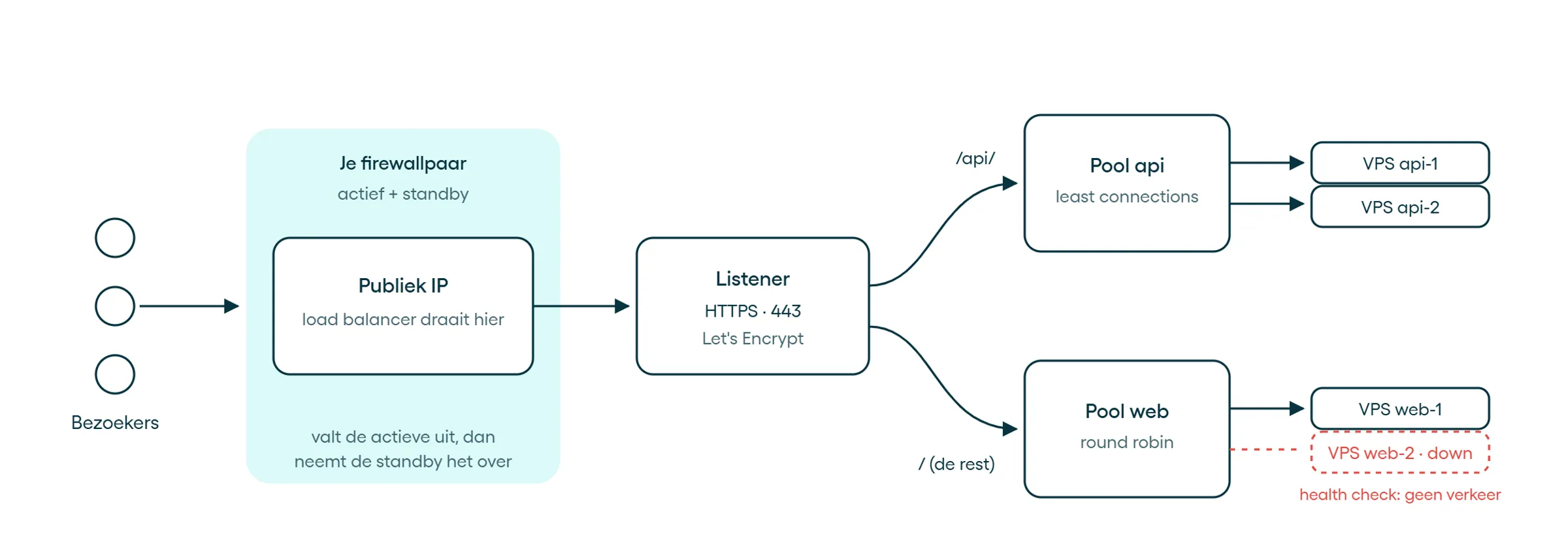
Example: one HTTPS listener with two routes. You can also open HTTP and TCP listeners.

What you use a load balancer for

Several web servers behind one address

Run your site on two or more VPSs. If one fails, traffic goes to the others.

Website and API on one IP

Routes by host or path send /api/ to one pool and everything else to another.

Maintenance without taking your site down

Set a server to Drain: it gets no new connections. Done? Enable the server again.

Spread a TCP service

A TCP listener passes traffic to your servers unchanged, for example for a database, mail or Redis.

Under the hood

You set it up through the portal or the API.

Protocols and IP
HTTP, HTTPS with HTTP/2 and TCP, over IPv4 and IPv6. Your servers are reached over IPv4.
Certificates
Let's Encrypt per hostname, renewed automatically, or your own PEM certificate. Several certificates per HTTPS listener.
Balancing
Round robin, least connections or by the visitor's IP address, with a weight per server
Session persistence
By the visitor's IP address, or with a cookie for HTTP and HTTPS
Health checks
Per pool, a TCP check or an HTTP check on a path, with status codes and text in the response. You set the interval, timeout and thresholds yourself.
Routes
By host and path, to different pools
Access
Restrict each listener to your own networks, IPv4 and IPv6
Limits
A maximum number of connections. For HTTP and HTTPS also a limit on requests per IP address.
Visitor IP
Your servers see the visitor's real IP address: as the source address for IPv4, and for HTTP and HTTPS in the X-Forwarded-For header
Availability
99.90% SLA. Runs on both nodes of your firewall pair, with takeover on failure
Regions
The Netherlands and Germany
Management and insight
In the portal and through the API. Topology, logs and performance graphs per listener.
Support
24/7, by email or phone
Servers
Flexible VPS behind your firewall, with the firewall as their gateway. Bare Metal is coming.
Not supported
UDP, HTTP/3, a web application firewall (WAF) and servers outside Worldstream

Questions people ask before they start

There is more on how load balancing works in our knowledge base article.

A firewall with a public IP in the portal, and Flexible VPSs on a network behind that firewall, with the firewall as their gateway. The firewall is free and the public IP is included in the load balancer price; you need no extra VM or IP address. An extra IPv4 address may carry a monthly fee. You also need a payment method. Each firewall runs one load balancer. Without a firewall with a public IP, or without a payment method, you cannot create a load balancer in the portal yet. The plan applies per load balancer: if you have a firewall in the Netherlands and one in Germany, you pay for two load balancers.

Ready to spread the load?

Set up your load balancer in the portal, on your existing firewall.