Load Balancer in Portal: what it is and how to create one
Respuesta rápida
A Worldstream Load Balancer sits on an existing firewall and publishes services on that firewall’s public IP. There is no extra load-balancer VM and no extra public IP. Create one under Networking & Security → Load Balancers → Create load balancer, then add a pool, a real server, and a listener.
The Portal load balancer is an add-on on your HA firewall, not a standalone appliance. Visitors connect to a public IP that already belongs to the firewall. The load balancer then spreads that traffic across VPS instances behind the firewall.
One load balancer attaches to one firewall. The sidebar item is Load Balancers, under Networking & Security. If you do not see it, the Load Balancer product is not enabled on the account yet.
For the idea of health checks, algorithms, and sticky sessions, see Understanding load balancing. This article is the Portal product.
What you need first
- An active Firewall with at least one ready public IP. Create that under Firewall if you do not have one yet; see Firewall basics in Portal.
- A billing agreement. Create is blocked until payment is set up, the same way other paid services are.
- Backend VPS instances on a network attached to that firewall. Those guests must use the firewall as their default gateway. The load balancer does not rewrite source addresses, so return traffic has to go back through the same firewall.
Note: Creating a load balancer resizes the firewall pair to fit the plan, one leg at a time. NAT and VPN traffic on that firewall sees a short interruption (about two seconds) while the first leg hands over.
Create a load balancer
Open Load Balancers
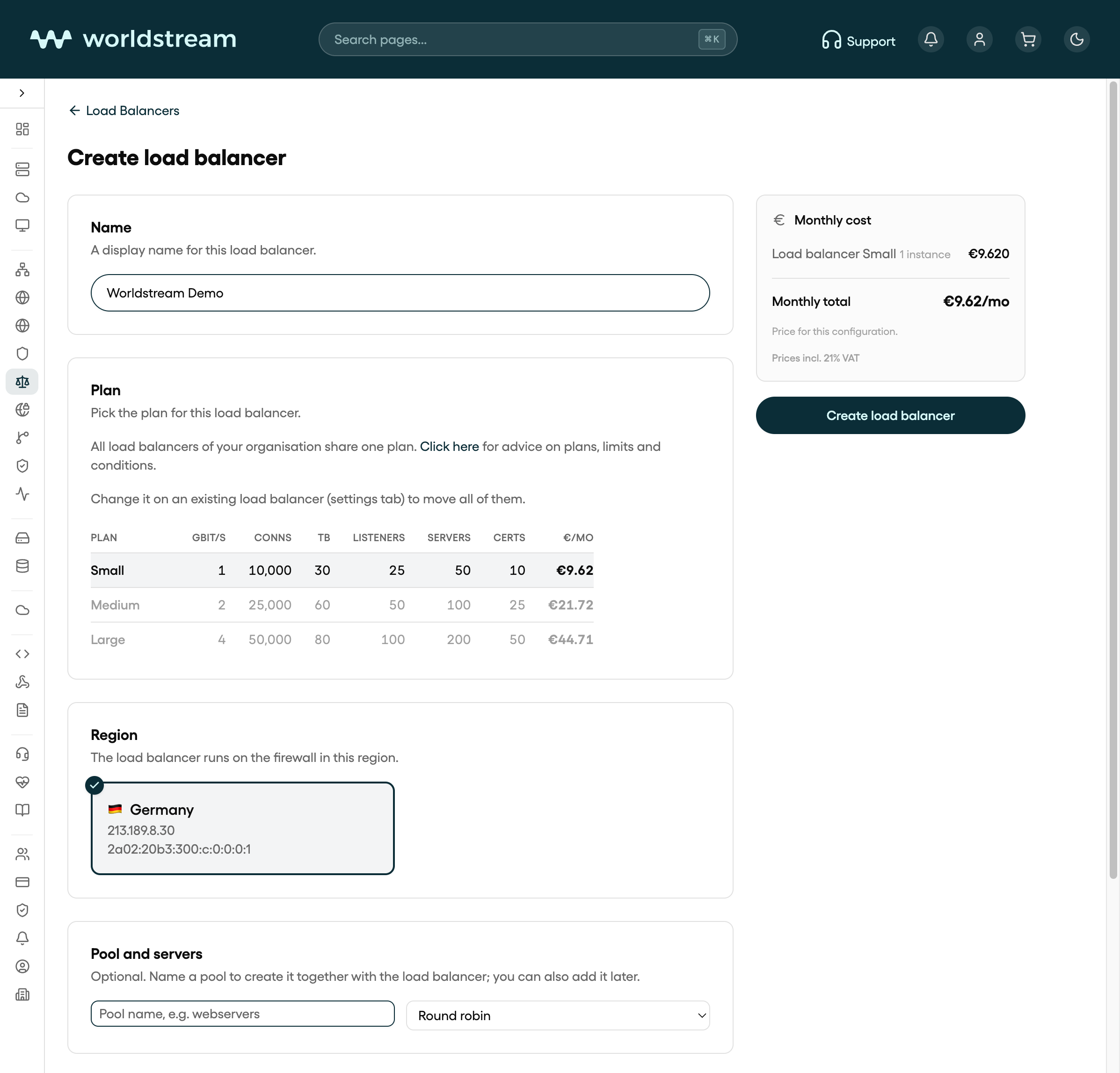
In Portal, go to Load Balancers and select Create load balancer.
Name it
The default name is load-balancer. Change it if you want a name you will recognise in the list later. There is no rename action after create.
Choose a plan
Each plan card lists bandwidth, concurrent connections, included traffic, and the limits for listeners, servers, and certificates. All load balancers on your account share one plan. After the first one exists, change the plan on an existing load balancer under Settings. For which size to pick, and the limits and terms, see Load balancer plans, limits and conditions.
Bind the firewall
Under Region and firewall, pick the firewall that should carry this load balancer. Firewalls that already have a load balancer are not offered. If the list is empty, create or extend a firewall first.
Optionally add a pool and listeners
The create form can also take a first pool, real servers, and listeners. You can skip that and add them on the load balancer after it is Active. Confirm Create load balancer.
Wait until the status is Active
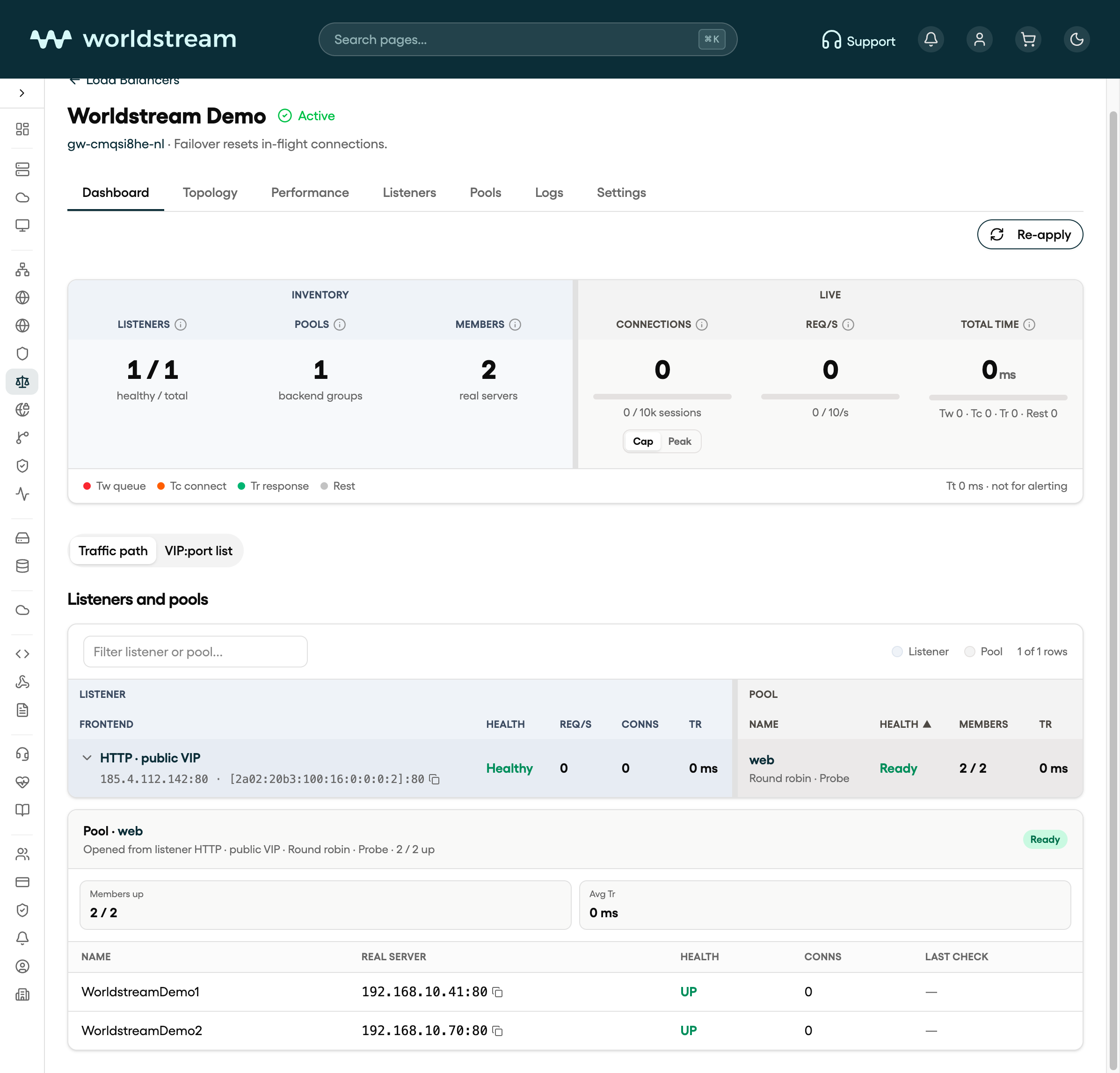
Create returns immediately. The load balancer moves through Syncing until it is Active. Error means the last apply failed; the firewall’s own NAT and filter rules are left alone. Use Re-apply on the Dashboard tab after you fix the config.
After it is Active
The load balancer page has these tabs:
| Tab | What it is for |
|---|---|
| Dashboard | Counts, live connections, the VIP-to-member map, and Re-apply |
| Topology | How listeners, pools, and real servers connect |
| Performance | Request rate, bandwidth, connections, and HTTP 5xx over time |
| Listeners | The public IP, port, and protocol that receive traffic |
| Pools | Groups of real servers, algorithms, stickiness, and health checks |
| Logs | Load balancer access and journal lines |
| Settings | Plan, Let's Encrypt contact email, and delete |
Recommended order after create: pool → real server → listener. Traffic has nowhere to go until a pool has at least one member and a listener points at that pool.
Note: Firewall failover resets in-flight connections. New connections continue on the other firewall leg.
What this product does not do
- It does not allocate a separate public IP for the load balancer. Listeners bind addresses that already exist on the firewall (you can add IPv4 or IPv6 there when you create a listener).
- Real servers are IPv4. A listener can still answer on IPv6; members behind it stay IPv4.
- UDP is not a listener protocol. Choose HTTPS, HTTP, or TCP.
- It is not a WAF or a CDN.
Next: add a pool and real servers, then open a listener.