Load Balancer listeners: ports, TLS, and routing
Respuesta rápida
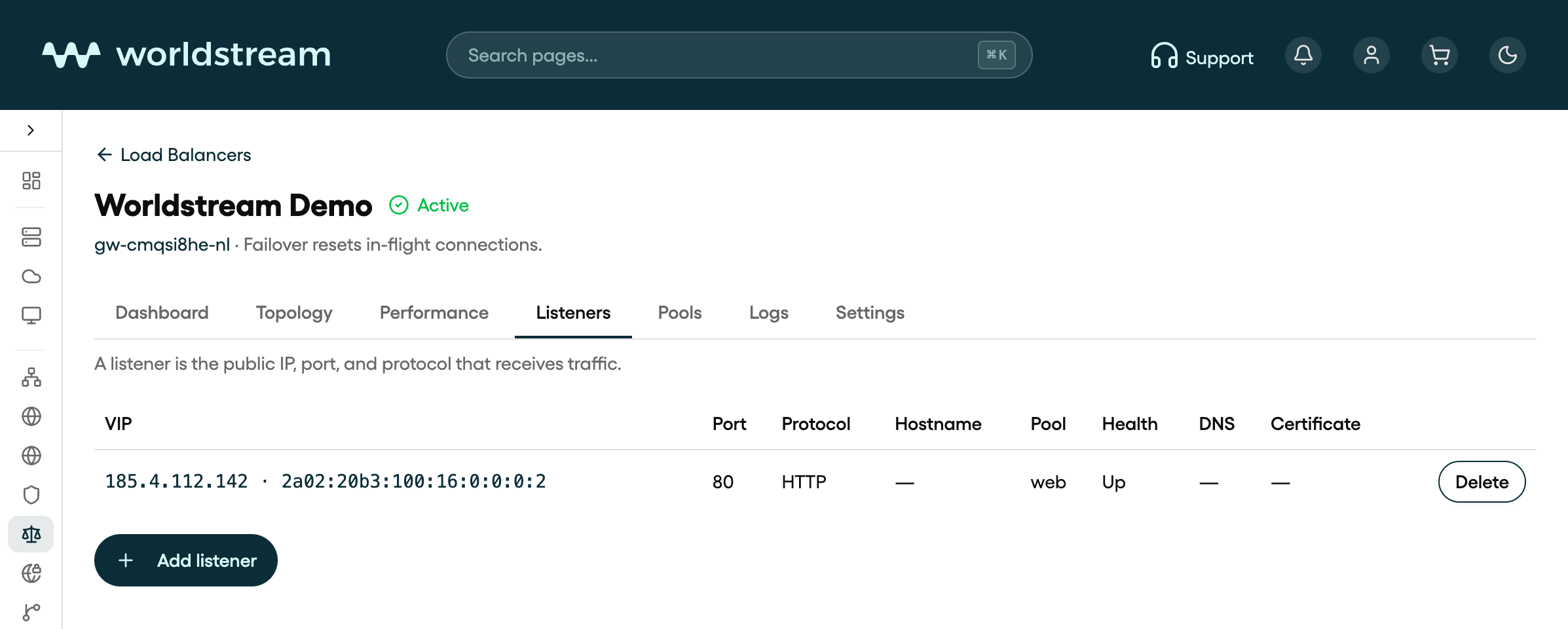
A listener is the public IP, port, and protocol that receives traffic. Add one on the load balancer’s Listeners tab after the pool has at least one real server. HTTPS needs a hostname whose DNS already points at that public IP; Let’s Encrypt can issue the certificate, or you upload your own PEM.
A listener is the front door: public address, port, and protocol. The pool behind it is where connections go. Create the pool and at least one real server first. The empty Listeners tab says the same: pool → real server → listener.
Open the load balancer, then the Listeners tab, then Add listener.
Public IPs
The Public IPs field picks which firewall addresses this listener binds.
- IPv4 is the usual visitor address.
- IPv6 is optional on the same port. Members behind the listener stay IPv4.
- Only addresses in READY state can be selected. Add IPv4 and Add IPv6 allocate a new address on the same firewall if you still have quota. IPv6 does not count against the IPv4 limit; IPv4 may add a monthly charge, which the confirm dialog shows when pricing is available.
You cannot change the public address or protocol after create. Delete the listener and add a new one if you need a different port or protocol.
Protocol and port
| Protocol | Use it when |
|---|---|
| HTTPS | Websites and APIs that should terminate TLS on the load balancer (HTTP/2 is offered to clients) |
| HTTP | Plain web traffic, or when you want port 80 yourself instead of the HTTPS redirect |
| TCP | Pass traffic through unchanged, including TLS that the real server terminates itself |
The hint in the form is the same: HTTPS for websites, HTTP for plain web traffic, TCP to pass traffic through unchanged.
HTTPS also needs a hostname whose DNS already points at this public IP. If you also bound IPv6, the hostname needs a matching AAAA.
HTTPS certificates
On Add listener, with protocol HTTPS:
Type the hostname
For example app.example.com. Portal checks that DNS already points at the VIP.
Choose a certificate
Pick Let's Encrypt or Upload your own.
HTTP to HTTPS redirect
Leave Redirect HTTP to HTTPS on unless you need a separate HTTP listener on port 80.
Let's Encrypt uses HTTP-01. The hostname must resolve to the listener IP before you create the listener. Worldstream does not write DNS records for you.
Upload your own takes a Certificate (PEM) and Private key (PEM). Extra names in the certificate are included only when they also resolve to this IP.
After create, open the listener and use the Certificate tab to add names or re-issue. Account-wide Let's Encrypt contact email lives on the load balancer Settings tab (Let's Encrypt contact / Override email). If you leave it empty, Portal uses the account owner email.
Note: Turning the HTTP redirect off still opens port 80 temporarily during certificate request and renewal. That port then answers only
/.well-known/acme-challenge/, not your site.
An explicit HTTP listener on port 80 replaces that redirect. The ACME challenge path stays.
Who may connect, limits, and routes
Open a listener from the table to edit it. Tabs are General, Certificate (HTTPS only), Capacity, and Routes (HTTP and HTTPS).
General
- Default pool — where new connections go when no host or path rule matches.
- Who may connect — source networks, one CIDR per line. Empty is the public internet. IPv4 and IPv6 CIDRs are both valid. A v4-only list denies IPv6, and the other way around.
Capacity (optional on create under Limits)
- Max concurrent connections — leave empty to use the plan limit.
- HTTP rate limit — requests per 10 seconds from one client IP, HTTP and HTTPS only. Empty means no limit.
- Timeouts: Client timeout (1–3600 s), Server timeout (1–3600 s), Connect timeout (1–120 s).
Routes (HTTP and HTTPS)
Send some hostnames or URL prefixes to another pool. First matching rule wins. Everything else uses the default pool. Fields are Host (optional, for example api.example.com), Path prefix (optional, for example /api/v1.json), and Send to pool, then Add rule.
TCP listeners have no Routes tab. Use TCP when you want TLS passthrough to the real servers instead of terminating TLS on the load balancer.
After you add a listener
Status on the load balancer goes to Syncing while the change is applied, then Active. The listener table shows VIP, port, protocol, hostname, pool, health, DNS (Points at VIP or a mismatch), and certificate state.
Delete a listener from the table. Traffic on that VIP and port stops.