Saltar al contenido principal
Soporte
0
Contacta con nosotros
English
Nederlands
Deutsch
Servidores dedicadosFlexible VPSTecnología de nubeUbicación compartidaDesafíos en TISectoresCareers
Cloud Compute

Con Cloud Compute, tendrás acceso a un portal desde el que podrás configurar todo tu entorno informático en cualquier momento y desde cualquier lugar del mundo.

Almacenamiento en la nube

Acceso fiable a tus archivos, infraestructura y aplicaciones en todo momento, sin interrupciones ni retrasos. En Worldstream, ofrecemos una gran variedad de soluciones de almacenamiento.

Flexible cloud icon
Nube flexible
Private cloud icon
Nube privada
Bare metal icon
Bare Metal Compute
Hollow cube icon
Almacenamiento de objetos
Hollow cube icon
Almacenamiento de archivos
Block storage icon
Almacenamiento en bloque
Backup storage icon
Almacenamiento de copias de seguridad
¿Necesitas soporte?

Con ingenieros experimentados y un tiempo medio de respuesta de 7 minutos, puedes esperar una solución de soporte técnico sólida muy rápida.

Soporte
Todos los servidores

Elige tu servidor dedicado ahora. Configuración personalizada o entrega inmediata. Servidores potentes diseñados para tu caso de uso.

Casos de uso

Sea cual sea tu caso de uso, te ayudamos a encontrar la solución adecuada.

Deal servers icon
Ofertas
AMD servers icon
Servidores AMD
AI servers icon
Servidores Intel
Hollow cube icon
Virtualización, Contenerización y Orquestación
Hollow cube icon
Sitios web y aplicaciones
Hollow cube icon
Infraestructura para gaming y streaming

Soporte 24/7/365 con un tiempo medio de respuesta de solo 7 minutos. Gracias a nuestros propios centros de datos, nuestros ingenieros pueden acceder directamente a tu servidor para ofrecer soporte rápido y directo. Contáctanos por correo o teléfono en cualquier momento.

Soporte
Externalización inteligente

Algunos aspectos de la TI crean valor añadido, mientras que otros sirven de apoyo. Aprovéchalo como punto de partida para la externalización.

Rentabilidad

Los paquetes informáticos completos pueden parecer la opción segura, pero al considerar los costes, otras opciones suelen tener más sentido.

Flexibilidad y control informáticos

Externalizar no implica perder el control; en realidad proporciona más flexibilidad y control.

Repatriación desde la nube

La nube no es el destino final: debes evaluar y ajustar tu entorno de nube continuamente a medida que cambian las necesidades.

Servicios financieros
Logística y transporte
Venta minorista y comercio electrónico
Medios de comunicación y entretenimiento
Tecnología y desarrollo de software
Seguridad
Proveedores de servicios gestionados
¿Necesitas soporte?

Con ingenieros experimentados y un tiempo medio de respuesta de 7 minutos, puedes esperar una solución de soporte técnico sólida muy rápida.

Habla con nosotrosContacta con nosotros
Acerca de WorldstreamAcerca de la tecnologíaCasosBase de conocimientos
Quiénes somosConoce al equipoTrabaja con nosotrosHazte distribuidorcertificacionesNuestros centros de datosNuestra redProtección DDoSServidores AMD EPYCPartners tecnológicosAcerca de los servidores dedicadosTodos los casosEasyTerraDutch Drone CompanyPerfGridArtículosPreguntas frecuentesNoticias y blogsProductos y servicios
Contacta con nosotros

Llama al +31 (0) 174 – 712 117 Industriestraat 53, Naaldwijk

Contacta con nosotros
Worldstream Portal
English
Nederlands
Deutsch
0
Servidores dedicadosFlexible VPSTecnología de nubeUbicación compartidaDesafíos en TISectoresCareersAcerca de WorldstreamAcerca de la tecnologíaCasosBase de conocimientosMy Worldstream
Contact
Soporte
EnglishNederlandsDeutsch
  1. InicioInicio
  2. Base de conocimientos
  3. Networking
  4. Load Balancer pools: real servers and health checks

Load Balancer pools: real servers and health checks

Se aplica a Load Balancer, Flexible VPSAudiencia All customersÚltima revisión October 2026Estado New

Respuesta rápida

A pool is the group of VMs that share traffic from a listener. Add a pool on the Pools tab, then Add real server (a VPS on a firewall-attached network, or a typed IPv4). Health checks decide which members receive traffic. Recommended order: pool → real server → listener.

En esta página
  • Add a pool
  • Add a real server
  • Health checks
  • Drain, weight, and PROXY

A pool is the group of VMs that share this traffic. The listener sends each new connection to one real server in that pool. Traffic has nowhere to go until the pool has at least one member.

Open the load balancer, then the Pools tab.

Add a pool

Select Add pool.

  • Name — unique on this load balancer (for example web).
  • Algorithm — how the next connection is chosen among healthy members:
    • Round robin — cycle through members in turn.
    • Least connections — send the next connection to whoever currently has the fewest.
    • Source IP hash — the same client IP keeps landing on the same member.
  • Stickiness — extra pinning on top of the algorithm: No stickiness, Source IP, or Cookie (HTTP/HTTPS). Cookie stickiness is for HTTP and HTTPS listeners only.

You can change algorithm, stickiness, PROXY protocol, and health later with Edit pool.

Add a real server

Select Add real server. Members must be IPv4 addresses on a network attached to this firewall, and those guests must use the firewall as default gateway.

Source is either:

  • VPS — pick a VPS from the list. Portal stores the guest IPv4 and updates it when the guest reports a new DHCP address. If the NIC has a static assigned IP, that address wins and will not follow DHCP — type the IP instead.
  • IPv4 address — a pin. It never follows the VPS. Use this for a fixed LAN address.

Then set Port (1–65535), the port the application listens on.

A typed IPv4 is never refreshed from a VM. For a VPS member, Refresh re-reads that NIC on demand.
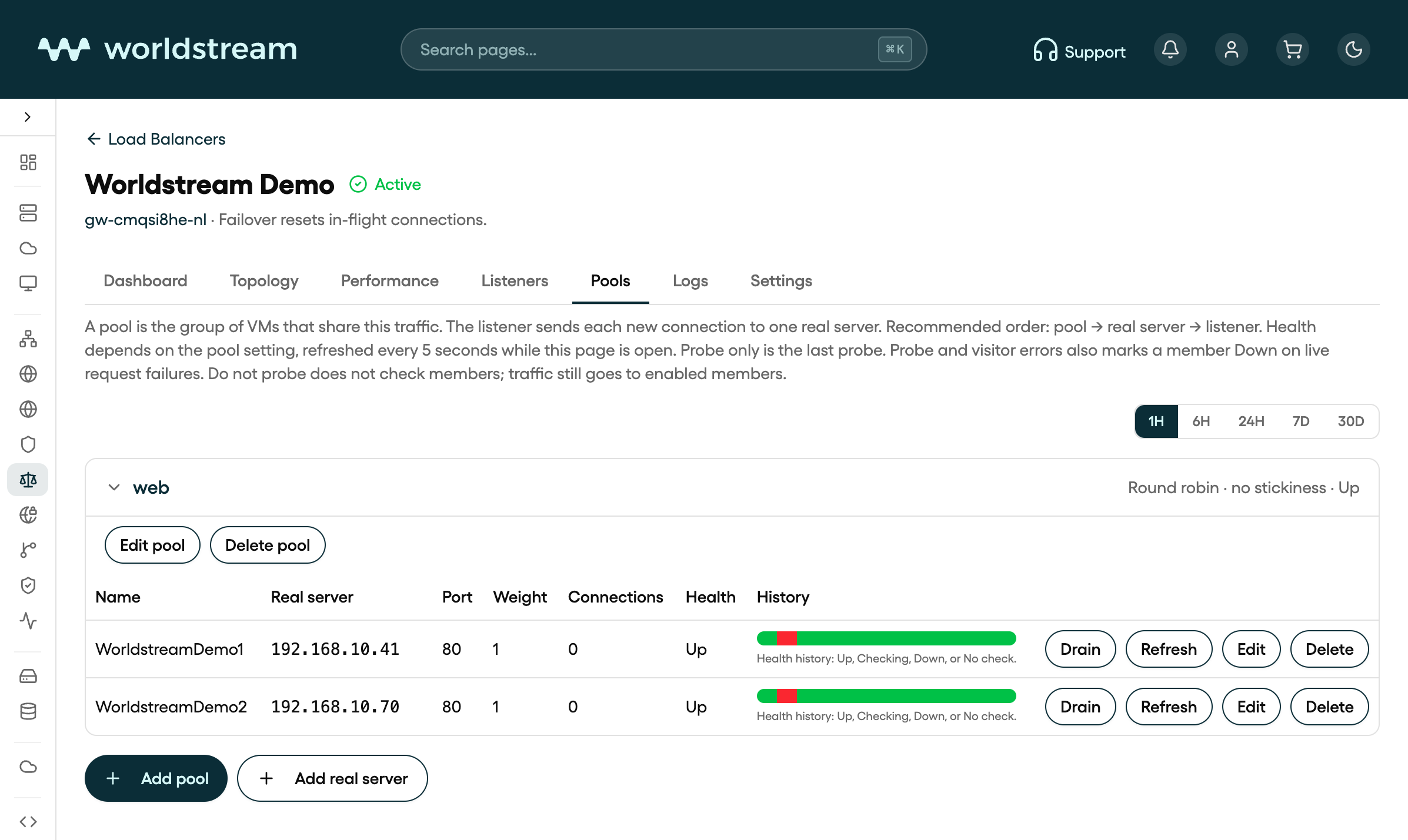
Pool web with real servers WorldstreamDemo1 and WorldstreamDemo2 on the Worldstream Demo load balancer in Portal
Pool web with real servers WorldstreamDemo1 and WorldstreamDemo2 on the Worldstream Demo load balancer in Portal, October 2026. Your own names and IPs will differ.

Health checks

On Edit pool, the Health panel controls whether a member receives traffic.

ModeWhat it does
Probe onlyMembers go Up or Down from the last probe only
Probe and visitor errorsMembers can also go Down from live request failures. The probe still brings them back
Do not probeEnabled members always get traffic. Health shows No check

When a probe runs:

  • Protocol — TCP or HTTP. Tick TLS if the probe should connect with TLS even when the listener is not HTTPS.
  • Destination port — empty uses the real server’s own port.
  • Interval (2–300 s), Timeout (1–60 s), Retries (1–10), Up after (1–10 successful probes).
  • For HTTP: optional Domain (Host header), Path (default /), optional body Response text, and Status codes (for example 200 or 2??).

Health on the Pools tab refreshes about every five seconds while the page is open.

Drain, weight, and PROXY

On each member row:

  • Drain stops new connections; existing ones can finish. Enable puts the member back in rotation.
  • Edit changes address, port, and Weight (1–256, default 1). Higher weight takes a larger share under round robin and least connections.
  • Delete removes the member.

On the pool itself, Send PROXY protocol to members is off by default. Turn it on only if the application expects that header. Members already see the visitor’s real IP address, not the firewall’s; PROXY is an extra header, not the only way to preserve the client IP.

Delete a pool only after any listener that still uses it has been pointed at another pool.

Artículos relacionados

  • Load Balancer in Portal: what it is and how to create one
  • Load Balancer listeners: ports, TLS, and routing
  • Understanding load balancing: what it does and how it decides
  • Firewall basics in Portal
¿Te ha resultado útil este artículo?

Informática sólida. Sin sorpresas

Tu socio para la madurez informática
Eliminamos barreras para que puedas correr
Costes previsibles y transparentes

Contacto

  • Industriestraat 53, Naaldwijk
Contacta con nosotros
Worldstream Portal (opens in a new tab)
  • Métodos de pago
  • Abuso
  • Recursos para desarrolladores
  • Centro de operaciones de red
  • Quiénes somos
  • Conoce al equipo
  • Trabaja con nosotros
  • Hazte distribuidor
  • certificaciones
  • Nuestros centros de datos
  • Nuestra red
  • Protección DDoS
  • Servidores AMD EPYC
  • Partners tecnológicos
  • Sistemas operativos
  • Vista general
  • Preguntas frecuentes
  • Casos
  • Noticias y blogs
  • Use Cases
English
Nederlands
Deutsch
English
Nederlands
Deutsch
  • Legal
  • Notificación de vulnerabilidades