Support
0
Contact us
Nederlands
Deutsch
Español
Dedicated serversFlexible VPSCloud TechnologyColocationChallenges in ITSectorsNews & Blogs
Cloud Compute

With Cloud Compute, you have access anytime and anywhere to a portal through which you can configure your entire IT environment from wherever you are in the world.

Cloud Storage

Reliable access to your files, infrastructure, and applications at all times – with no interruptions or delays. At Worldstream, we offer a variety of storage solutions.

Flexible cloud icon
Flexible cloud
Private cloud icon
Private cloud
Bare metal icon
Bare Metal Compute
Hollow cube icon
Object storage
Hollow cube icon
File storage
Block storage icon
Block storage
Backup storage icon
Backup storage
Need support?

With experienced engineers and an average response time track record on 7 minutes, you can expect a solid technical support solution in next to no time.

Support
All Servers

Choose your Dedicated Server now. Custom or Instant Delivery. Powerhouse servers built for your use case.

Use Cases

Whatever your use case, we’re here to help you find the ideal solution.

Deal servers icon
Deals
AMD servers icon
AMD Processors
AI servers icon
Intel Processors
Hollow cube icon
Virtualisation, Containerisation and Orchestration
Hollow cube icon
Websites and Applications
Hollow cube icon
Gaming and Streaming Infrastructure

24/7/365 support with an average response time of just 7 minutes. Thanks to our own data centers, our engineers can go directly to your server for fast, hands-on assistance. Email or call us anytime.

Support
Flexible VPS

Cloud servers from €5.19 per month, pay-per-use and live in minutes.

Flexible VPS add-ons

Extend your VPS. A load balancer spreads traffic across several VPSs.

Hollow cube icon
Standard
AMD servers icon
Performance
Hollow cube icon
Load Balancer
Need support?

With experienced engineers and an average response time track record on 7 minutes, you can expect a solid technical support solution in next to no time.

Support
Smart outsourcing

Some IT creates added value, while other types are supportive. Use that as a starting point for outsourcing.

Cost Efficiency

Complete IT packages may seem like the safe option, but when you consider the costs, other choices often make more sense.

IT flexibility & control

Outsourcing doesn’t mean losing control; it actually provides more flexibility and control.

Cloud repatriation

The cloud is not a final destination: You should continuously evaluate and adjust your cloud environment as needs evolve.

Financial services
Logistics & Transportation
Retail & E-commerce
Media & Entertainment
Tech & Software Development
Security
Managed Service Providers
Need support?

With experienced engineers and an average response time track record on 7 minutes, you can expect a solid technical support solution in next to no time.

Chat with usContact us
About WorldstreamAbout the technologyCasesKnowledge base
About usMeet the teamJobsBecome a resellerCertificationsOur data centersOur networkDDoS ProtectionAMD EPYC serversTechnology PartnersOperating SystemsAll casesEasyTerraDutch Drone CompanyPerfGridArticlesFAQNews and BlogsProducts and Services
Contact us

Call +31 (0) 174 – 712 117

Industriestraat 53, Naaldwijk

Contact us
Worldstream Portal
Nederlands
Deutsch
Español
0
Dedicated serversFlexible VPSCloud TechnologyColocationChallenges in ITSectorsNews & BlogsAbout WorldstreamAbout the technologyCasesKnowledge baseMy Worldstream
Contact
Support
NederlandsDeutschEspañol
  1. HomeHome
  2. Knowledge Base
  3. Networking
  4. Load Balancer listeners: ports, TLS, and routing

Load Balancer listeners: ports, TLS, and routing

Applies to Load BalancerAudience All customersLast reviewed October 2026Status New

Quick answer

A listener is the public IP, port, and protocol that receives traffic. Add one on the load balancer’s Listeners tab after the pool has at least one real server. HTTPS needs a hostname whose DNS already points at that public IP; Let’s Encrypt can issue the certificate, or you upload your own PEM.

On this page
  • Public IPs
  • Protocol and port
  • HTTPS certificates
  • Who may connect, limits, and routes
  • After you add a listener

A listener is the front door: public address, port, and protocol. The pool behind it is where connections go. Create the pool and at least one real server first. The empty Listeners tab says the same: pool → real server → listener.

Open the load balancer, then the Listeners tab, then Add listener.

Public IPs

The Public IPs field picks which firewall addresses this listener binds.

  • IPv4 is the usual visitor address.
  • IPv6 is optional on the same port. Members behind the listener stay IPv4.
  • Only addresses in READY state can be selected. Add IPv4 and Add IPv6 allocate a new address on the same firewall if you still have quota. IPv6 does not count against the IPv4 limit; IPv4 may add a monthly charge, which the confirm dialog shows when pricing is available.

You cannot change the public address or protocol after create. Delete the listener and add a new one if you need a different port or protocol.

Protocol and port

ProtocolUse it when
HTTPSWebsites and APIs that should terminate TLS on the load balancer (HTTP/2 is offered to clients)
HTTPPlain web traffic, or when you want port 80 yourself instead of the HTTPS redirect
TCPPass traffic through unchanged, including TLS that the real server terminates itself

The hint in the form is the same: HTTPS for websites, HTTP for plain web traffic, TCP to pass traffic through unchanged.

HTTPS also needs a hostname whose DNS already points at this public IP. If you also bound IPv6, the hostname needs a matching AAAA.

HTTPS certificates

On Add listener, with protocol HTTPS:

1

Type the hostname

For example app.example.com. Portal checks that DNS already points at the VIP.

2

Choose a certificate

Pick Let's Encrypt or Upload your own.

3

HTTP to HTTPS redirect

Leave Redirect HTTP to HTTPS on unless you need a separate HTTP listener on port 80.

Let's Encrypt uses HTTP-01. The hostname must resolve to the listener IP before you create the listener. Worldstream does not write DNS records for you.

Upload your own takes a Certificate (PEM) and Private key (PEM). Extra names in the certificate are included only when they also resolve to this IP.

After create, open the listener and use the Certificate tab to add names or re-issue. Account-wide Let's Encrypt contact email lives on the load balancer Settings tab (Let's Encrypt contact / Override email). If you leave it empty, Portal uses the account owner email.

Note: Turning the HTTP redirect off still opens port 80 temporarily during certificate request and renewal. That port then answers only /.well-known/acme-challenge/, not your site.

An explicit HTTP listener on port 80 replaces that redirect. The ACME challenge path stays.
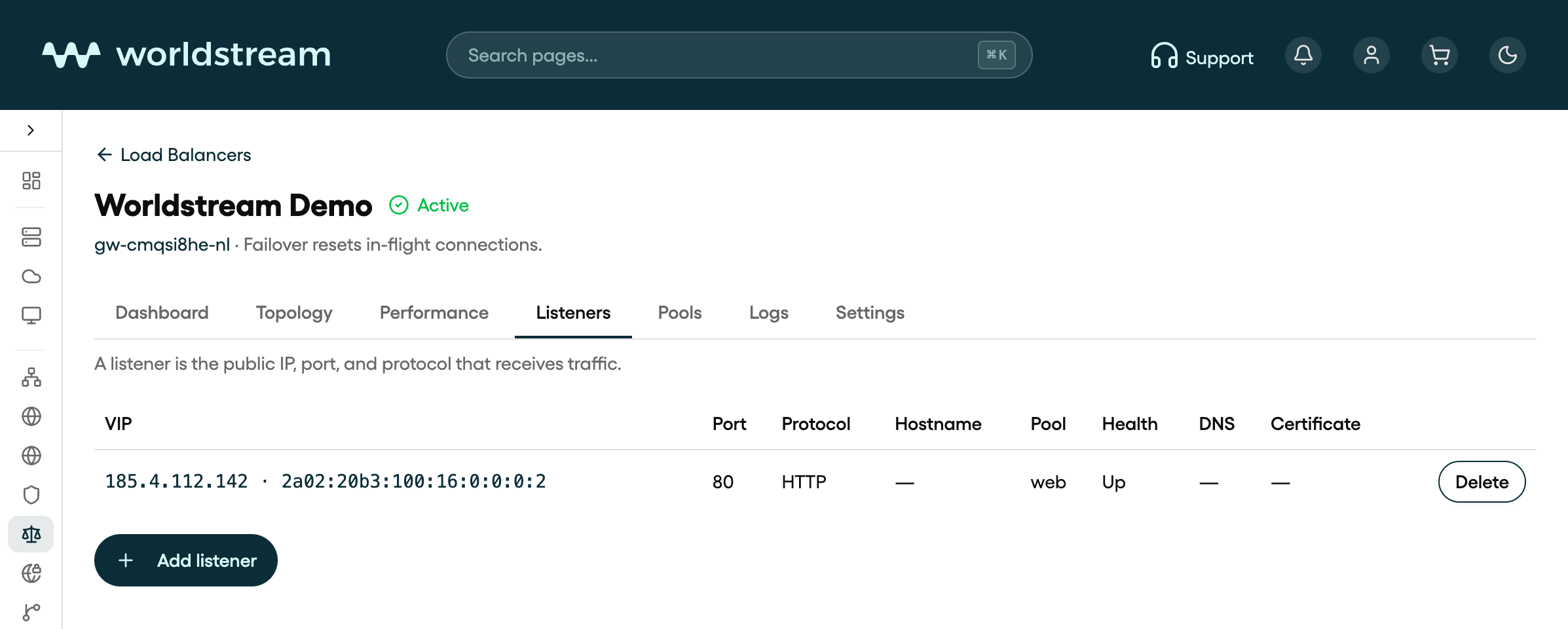
Listeners tab in Portal: HTTP listener on port 80 for Worldstream Demo, pool web, health Up
Listeners tab on the Worldstream Demo load balancer in Portal, October 2026. Your own names, IPs, and counts will differ.

Who may connect, limits, and routes

Open a listener from the table to edit it. Tabs are General, Certificate (HTTPS only), Capacity, and Routes (HTTP and HTTPS).

General

  • Default pool — where new connections go when no host or path rule matches.
  • Who may connect — source networks, one CIDR per line. Empty is the public internet. IPv4 and IPv6 CIDRs are both valid. A v4-only list denies IPv6, and the other way around.

Capacity (optional on create under Limits)

  • Max concurrent connections — leave empty to use the plan limit.
  • HTTP rate limit — requests per 10 seconds from one client IP, HTTP and HTTPS only. Empty means no limit.
  • Timeouts: Client timeout (1–3600 s), Server timeout (1–3600 s), Connect timeout (1–120 s).

Routes (HTTP and HTTPS)

Send some hostnames or URL prefixes to another pool. First matching rule wins. Everything else uses the default pool. Fields are Host (optional, for example api.example.com), Path prefix (optional, for example /api/v1.json), and Send to pool, then Add rule.

TCP listeners have no Routes tab. Use TCP when you want TLS passthrough to the real servers instead of terminating TLS on the load balancer.

After you add a listener

Status on the load balancer goes to Syncing while the change is applied, then Active. The listener table shows VIP, port, protocol, hostname, pool, health, DNS (Points at VIP or a mismatch), and certificate state.

Delete a listener from the table. Traffic on that VIP and port stops.

Related articles

  • Load Balancer in Portal: what it is and how to create one
  • Load Balancer pools: real servers and health checks
  • How SSL/TLS certificates work
  • Firewall basics in Portal
Was this article helpful?

Solid IT. No Surprises

Sparring partner for IT maturity
Eliminating barriers so you can run
Predictable and transparant costs

Contact

  • Industriestraat 53, Naaldwijk
Contact us
Worldstream Portal (opent in nieuw tabblad)
  • Payment Methods
  • Abuse
  • Developers Resources
  • Network Operations Center
  • About us
  • Meet the team
  • Jobs
  • Become a reseller
  • Certifications
  • Our data centers
  • Our network
  • DDoS Protection
  • AMD EPYC servers
  • Technology Partners
  • Operating Systems
  • Overview
  • FAQ
  • Cases
  • News & Blogs
  • Use Cases
Nederlands
Deutsch
Español
Nederlands
Deutsch
Español
  • Legal
  • Disclosure