Support
0
Contact us
Nederlands
Deutsch
Español
Dedicated serversFlexible VPSCloud TechnologyColocationChallenges in ITSectorsNews & Blogs
Cloud Compute

With Cloud Compute, you have access anytime and anywhere to a portal through which you can configure your entire IT environment from wherever you are in the world.

Cloud Storage

Reliable access to your files, infrastructure, and applications at all times – with no interruptions or delays. At Worldstream, we offer a variety of storage solutions.

Flexible cloud icon
Flexible cloud
Private cloud icon
Private cloud
Bare metal icon
Bare Metal Compute
Hollow cube icon
Object storage
Hollow cube icon
File storage
Block storage icon
Block storage
Backup storage icon
Backup storage
Need support?

With experienced engineers and an average response time track record on 7 minutes, you can expect a solid technical support solution in next to no time.

Support
All Servers

Choose your Dedicated Server now. Custom or Instant Delivery. Powerhouse servers built for your use case.

Use Cases

Whatever your use case, we’re here to help you find the ideal solution.

Deal servers icon
Deals
AMD servers icon
AMD Processors
AI servers icon
Intel Processors
Hollow cube icon
Virtualisation, Containerisation and Orchestration
Hollow cube icon
Websites and Applications
Hollow cube icon
Gaming and Streaming Infrastructure

24/7/365 support with an average response time of just 7 minutes. Thanks to our own data centers, our engineers can go directly to your server for fast, hands-on assistance. Email or call us anytime.

Support
Flexible VPS

Cloud servers from €5.19 per month, pay-per-use and live in minutes.

Flexible VPS add-ons

Extend your VPS. A load balancer spreads traffic across several VPSs.

Hollow cube icon
Standard
AMD servers icon
Performance
Hollow cube icon
Load Balancer
Need support?

With experienced engineers and an average response time track record on 7 minutes, you can expect a solid technical support solution in next to no time.

Support
Smart outsourcing

Some IT creates added value, while other types are supportive. Use that as a starting point for outsourcing.

Cost Efficiency

Complete IT packages may seem like the safe option, but when you consider the costs, other choices often make more sense.

IT flexibility & control

Outsourcing doesn’t mean losing control; it actually provides more flexibility and control.

Cloud repatriation

The cloud is not a final destination: You should continuously evaluate and adjust your cloud environment as needs evolve.

Financial services
Logistics & Transportation
Retail & E-commerce
Media & Entertainment
Tech & Software Development
Security
Managed Service Providers
Need support?

With experienced engineers and an average response time track record on 7 minutes, you can expect a solid technical support solution in next to no time.

Chat with usContact us
About WorldstreamAbout the technologyCasesKnowledge base
About usMeet the teamJobsBecome a resellerCertificationsOur data centersOur networkDDoS ProtectionAMD EPYC serversTechnology PartnersOperating SystemsAll casesEasyTerraDutch Drone CompanyPerfGridArticlesFAQNews and BlogsProducts and Services
Contact us

Call +31 (0) 174 – 712 117

Industriestraat 53, Naaldwijk

Contact us
Worldstream Portal
Nederlands
Deutsch
Español
0
Dedicated serversFlexible VPSCloud TechnologyColocationChallenges in ITSectorsNews & BlogsAbout WorldstreamAbout the technologyCasesKnowledge baseMy Worldstream
Contact
Support
NederlandsDeutschEspañol
  1. HomeHome
  2. Knowledge Base
  3. Networking
  4. Load Balancer pools: real servers and health checks

Load Balancer pools: real servers and health checks

Applies to Load Balancer, Flexible VPSAudience All customersLast reviewed October 2026Status New

Quick answer

A pool is the group of VMs that share traffic from a listener. Add a pool on the Pools tab, then Add real server (a VPS on a firewall-attached network, or a typed IPv4). Health checks decide which members receive traffic. Recommended order: pool → real server → listener.

On this page
  • Add a pool
  • Add a real server
  • Health checks
  • Drain, weight, and PROXY

A pool is the group of VMs that share this traffic. The listener sends each new connection to one real server in that pool. Traffic has nowhere to go until the pool has at least one member.

Open the load balancer, then the Pools tab.

Add a pool

Select Add pool.

  • Name — unique on this load balancer (for example web).
  • Algorithm — how the next connection is chosen among healthy members:
    • Round robin — cycle through members in turn.
    • Least connections — send the next connection to whoever currently has the fewest.
    • Source IP hash — the same client IP keeps landing on the same member.
  • Stickiness — extra pinning on top of the algorithm: No stickiness, Source IP, or Cookie (HTTP/HTTPS). Cookie stickiness is for HTTP and HTTPS listeners only.

You can change algorithm, stickiness, PROXY protocol, and health later with Edit pool.

Add a real server

Select Add real server. Members must be IPv4 addresses on a network attached to this firewall, and those guests must use the firewall as default gateway.

Source is either:

  • VPS — pick a VPS from the list. Portal stores the guest IPv4 and updates it when the guest reports a new DHCP address. If the NIC has a static assigned IP, that address wins and will not follow DHCP — type the IP instead.
  • IPv4 address — a pin. It never follows the VPS. Use this for a fixed LAN address.

Then set Port (1–65535), the port the application listens on.

A typed IPv4 is never refreshed from a VM. For a VPS member, Refresh re-reads that NIC on demand.
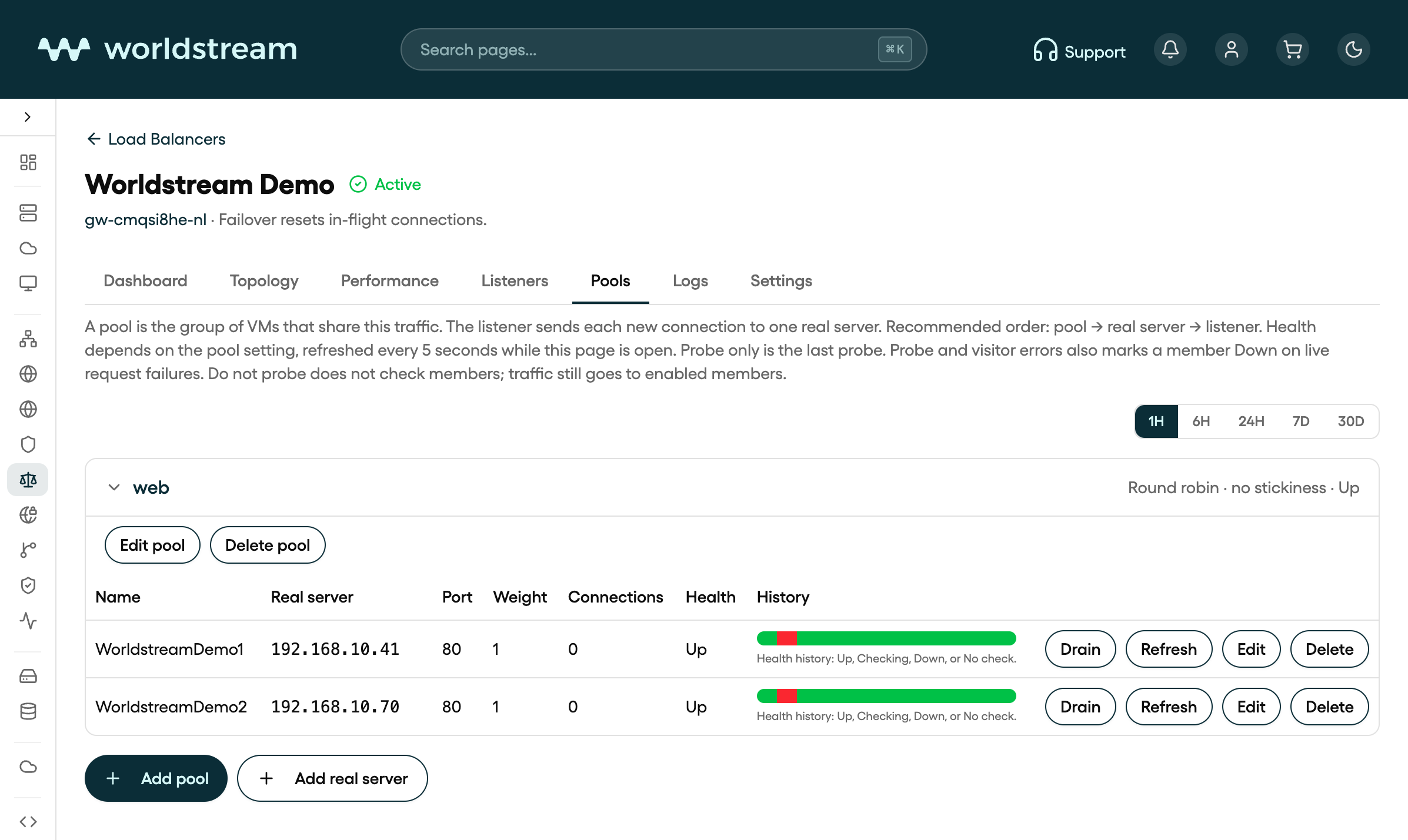
Pool web with real servers WorldstreamDemo1 and WorldstreamDemo2 on the Worldstream Demo load balancer in Portal
Pool web with real servers WorldstreamDemo1 and WorldstreamDemo2 on the Worldstream Demo load balancer in Portal, October 2026. Your own names and IPs will differ.

Health checks

On Edit pool, the Health panel controls whether a member receives traffic.

ModeWhat it does
Probe onlyMembers go Up or Down from the last probe only
Probe and visitor errorsMembers can also go Down from live request failures. The probe still brings them back
Do not probeEnabled members always get traffic. Health shows No check

When a probe runs:

  • Protocol — TCP or HTTP. Tick TLS if the probe should connect with TLS even when the listener is not HTTPS.
  • Destination port — empty uses the real server’s own port.
  • Interval (2–300 s), Timeout (1–60 s), Retries (1–10), Up after (1–10 successful probes).
  • For HTTP: optional Domain (Host header), Path (default /), optional body Response text, and Status codes (for example 200 or 2??).

Health on the Pools tab refreshes about every five seconds while the page is open.

Drain, weight, and PROXY

On each member row:

  • Drain stops new connections; existing ones can finish. Enable puts the member back in rotation.
  • Edit changes address, port, and Weight (1–256, default 1). Higher weight takes a larger share under round robin and least connections.
  • Delete removes the member.

On the pool itself, Send PROXY protocol to members is off by default. Turn it on only if the application expects that header. Members already see the visitor’s real IP address, not the firewall’s; PROXY is an extra header, not the only way to preserve the client IP.

Delete a pool only after any listener that still uses it has been pointed at another pool.

Related articles

  • Load Balancer in Portal: what it is and how to create one
  • Load Balancer listeners: ports, TLS, and routing
  • Understanding load balancing: what it does and how it decides
  • Firewall basics in Portal
Was this article helpful?

Solid IT. No Surprises

Sparring partner for IT maturity
Eliminating barriers so you can run
Predictable and transparant costs

Contact

  • Industriestraat 53, Naaldwijk
Contact us
Worldstream Portal (opens in a new tab)
  • Payment Methods
  • Abuse
  • Developers Resources
  • Network Operations Center
  • About us
  • Meet the team
  • Jobs
  • Become a reseller
  • Certifications
  • Our data centers
  • Our network
  • DDoS Protection
  • AMD EPYC servers
  • Technology Partners
  • Operating Systems
  • Overview
  • FAQ
  • Cases
  • News & Blogs
  • Use Cases
Nederlands
Deutsch
Español
Nederlands
Deutsch
Español
  • Legal
  • Disclosure